
A warehouse robot approaches a shelf. It needs to stop at the correct tote, identify whether the tote is the blue one scheduled for pickup, and avoid a worker who has stepped into the aisle. One sensing choice will not solve all three problems equally well.
Proximity sensors can tell the robot that something is near. A camera can often tell it what the thing is, where it is, and whether it is relevant to the task. But cameras also introduce lighting, computing, calibration, and reliability challenges that a simple sensor may avoid.
This is the practical design question behind many robotics projects: does the robot merely need to detect presence, or does it need to interpret a scene? The answer affects cost, response time, software complexity, and—when people share the workspace—safety.
Computer vision is not a universal upgrade over proximity sensing. The strongest systems choose the sensor that matches the decision the robot must make, then combine sensors where uncertainty or risk is too high.
🧭 Start With the Robot’s Actual Decision
The right sensor follows the decision, not the trend. Before selecting hardware, write the decision in a testable form: “stop before contact,” “align with a charging dock,” “sort red caps from blue caps,” or “verify that a seal is present.”
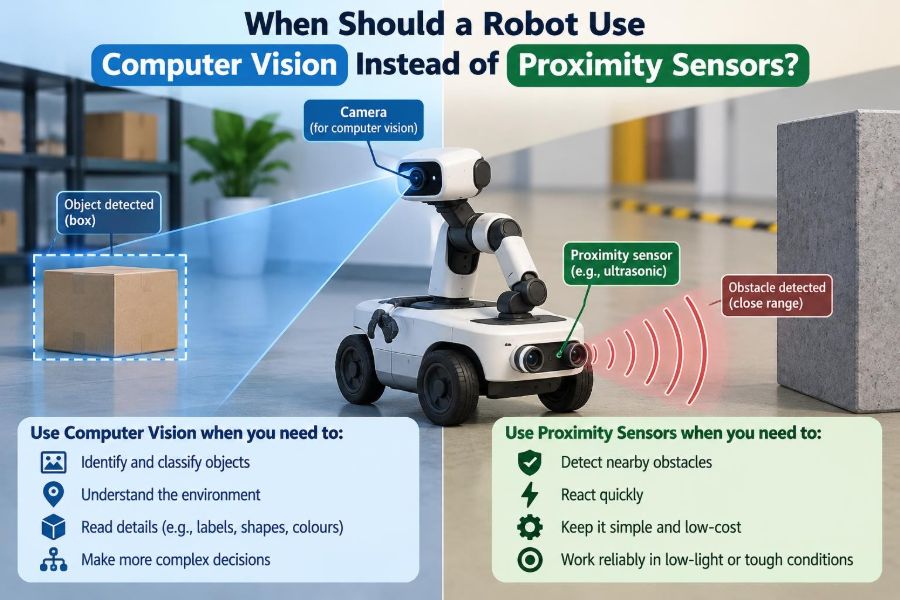
If the decision only requires knowing whether an object has entered a defined zone, proximity sensing is often sufficient. If it requires recognizing identity, shape, orientation, surface condition, text, or a changing scene, computer vision becomes much more appropriate.
📏 What Proximity Sensors Actually Measure
“Proximity sensor” describes a family of devices that detect nearby objects without physical contact. Depending on the technology, they may report a simple on/off signal, an approximate distance, or the presence of a material.
Common examples include ultrasonic sensors, infrared time-of-flight sensors, inductive sensors for metal, capacitive sensors for many materials, and laser-based range sensors. Their output is usually far simpler than an image, which is often exactly their advantage.
👁️ What Computer Vision Adds
Computer vision uses one or more cameras and algorithms to extract useful information from images or video. A basic system might locate a dark object against a light conveyor. A more advanced one might classify products, read labels, estimate pose, or track people over time.
A camera observes a field of view rather than one narrow point. That richer observation enables context: the robot can distinguish a box from a hand, see that an aisle is blocked, or find a part even when it is not in the expected position.
🔎 Presence Detection Versus Scene Understanding
The central distinction is simple. Proximity sensing answers questions such as “Is something within 20 centimeters?” Vision can answer “Is that the correct carton, and is its barcode-facing side accessible?”
Do not pay for scene understanding when a threshold is enough. Conversely, do not force a proximity sensor to solve an identity problem by adding rigid fixtures, strict object placement, and fragile assumptions when a camera could evaluate the variation directly.
⚡ When a Fast Binary Signal Is Best
On a high-speed conveyor, a photoelectric or inductive sensor can trigger a controller with low latency and little processing. For counting uniformly spaced metal tabs or stopping a mechanism at a repeatable point, a simple signal is robust and easy to validate.
A vision system may perform the same task, but it adds exposure timing, image transfer, processing, and algorithmic decisions. Those components are justified only if the robot also needs information the binary sensor cannot provide.
🎨 Use Vision When Appearance Determines the Action
Choose computer vision when color, markings, texture, damage, or shape changes the robot’s next move. Examples include separating ripe from unripe produce, detecting a missing connector pin, checking a printed code, or rejecting a scratched surface.
A proximity sensor may confirm that an item arrived at the inspection station. It cannot normally determine whether the item is acceptable. This is a frequent and useful division of labor: presence sensing triggers imaging, then vision makes the quality decision.
🧩 Handling Random Position and Orientation
Parts presented in a precise fixture are comparatively easy to automate with fixed coordinates and proximity switches. Parts dropped randomly into a bin are different: the robot must locate a graspable object and estimate its orientation.
For this class of task, 2D or 3D vision is often necessary. The system may identify candidate objects, reject overlaps, estimate a pick point, and guide the robot arm. Depth cameras can help when height and pose matter, although reflective, transparent, or dark surfaces can still be difficult.
📍 Why Distance Alone Can Be Ambiguous
A distance reading tells the robot where a surface appears to be along one measurement path. It may not reveal whether that surface belongs to a pallet, a person, a dangling cable, or the intended workpiece.
Vision provides spatial relationships across an image. A mobile robot can use that broader view to decide whether an obstacle blocks its route, whether there is room to pass, or whether a docking marker is visible.
🧱 Cases Where Proximity Sensors Win Clearly
Use a proximity sensor first when the environment is controlled and the task is narrow. It can be a better engineering choice for detecting a door’s closed position, confirming that a metal workpiece reached a jig, sensing liquid level with an appropriate technology, or creating a close-range stop zone.
These sensors are compact, inexpensive relative to many vision deployments, and often easier to integrate with industrial controls. Their narrow purpose can also make failure analysis more straightforward.
🪞 Material and Surface Matter
No sensor sees every material equally well. Inductive sensors respond to conductive metal but not a cardboard box. Capacitive sensors can detect many nonmetallic materials, but sensitivity may vary with moisture, mounting, and nearby objects.
Cameras can struggle with glare, transparent film, low contrast, shadows, and highly reflective surfaces. Ultrasonic sensors may behave differently with soft, angled, or irregular targets. Sensor selection should be tested with the actual materials, finishes, and contamination expected in operation.
💡 Lighting Is Vision’s Hidden Infrastructure
A camera does not directly measure “a defect” or “a label”; it measures reflected light. If illumination changes across shifts or seasons, the same object may look different to the algorithm.
Reliable machine vision therefore treats lighting as part of the system design. Controlled backlighting can simplify silhouette inspection, diffuse lighting can reduce glare, and enclosed inspection cells can block ambient changes. Better lighting often delivers more reliability than a more elaborate model.
🌙 Low Light and Harsh Environments
In darkness, dust, steam, rain, or dirty lenses, a camera-based system may lose useful detail. Supplemental illumination helps in some cases, but it can attract its own problems, including reflections and maintenance needs.
Proximity technologies may remain more dependable in a tightly defined sensing zone. For example, a rugged sensor can verify that a mechanism reached its end position even when the surrounding work area is visually messy. The exact choice still depends on the sensing technology and environment.
📐 Calibration Turns Pixels Into Robot Coordinates
A camera image uses pixel coordinates; a robot moves in millimeters, degrees, and coordinate frames. Calibration establishes the relationship between the camera, the robot base, the tool, and the workspace.
For fixed inspection, calibration may be relatively stable. For robot-guided picking, small shifts in camera mounting, lens focus, or workcell geometry can create pick errors. Vision should be selected only when the team can install, verify, and maintain that geometric relationship.
⏱️ Latency Can Change the Correct Answer
Every sensor has a time budget: sensing, communication, computation, decision, and actuator response. A robot moving quickly may travel a meaningful distance while an image is captured and processed.
Vision can meet demanding timing requirements when designed carefully, but it must be measured under realistic load. If a safety stop or mechanism interlock needs an immediate deterministic response, a dedicated safety-rated sensing approach is usually more appropriate than relying on a general camera pipeline.
🛑 Safety Is Not Just Object Detection
Seeing a person is not automatically the same as providing a safety function. Safety-related applications require a hazard assessment, suitable components, correct installation, validation, and compliance with the requirements that apply to the machine and location.
A non-safety camera may still improve operations by detecting blocked paths or monitoring work. It should not be treated as the only protection against injury unless the entire safety function has been engineered and validated for that role.
🧠 Algorithms Need Boundaries
Rule-based vision—such as measuring an edge or comparing color within a fixed region—can work very well in controlled conditions. Machine-learning-based vision can handle more variation, such as diverse object appearances or complicated defect patterns.
Neither approach removes the need to define acceptable behavior. A model must be evaluated on representative images, including difficult lighting, unusual orientations, partial occlusions, and normal production variation. An algorithm that performs well in a demo may still fail at the edges of the real operating envelope.
🗂️ Training Data Is a Design Requirement
If a vision system uses machine learning, data collection is not a final software task. It is part of the sensor decision. The team needs examples that reflect the products, backgrounds, lighting, wear, and exceptions the robot will encounter.
Labels must match the action. If the robot needs a grasp point, merely labeling an object class may be insufficient. If a missed defect is costly, the evaluation must focus on those failure modes rather than a broad score that hides critical errors.
🔁 The Best Answer Is Often Sensor Fusion
Sensor fusion means combining measurements so that one sensor compensates for another’s limits. It need not be complicated. A beam sensor can announce that an object has reached a station; the camera then captures an image only when needed.
In mobile robotics, range sensors can provide close obstacle geometry while cameras supply semantic information such as signs, pallets, or people. Combining independent evidence can improve decision quality, but it also adds integration and failure-mode analysis.
| Task need | Usually a strong first choice | Why |
|---|---|---|
| Detect an object at one fixed point | Proximity sensor | Simple, fast, focused signal |
| Identify type, color, or label | Computer vision | Requires visual detail |
| Pick randomly oriented parts | Vision, often 3D | Needs location and pose |
| Confirm a mechanism reached its limit | Proximity sensor | Defined geometry and direct condition |
| Inspect an arriving item | Both | One triggers; one interprets |
🏭 A Conveyor Inspection Example
Imagine a packaging line where every carton should have a cap and a readable date code. A photoelectric sensor can detect the carton’s arrival and synchronize the inspection window.
A camera can then check cap presence, cap color, code placement, and legibility. Using vision alone to detect every carton may work, but the trigger sensor can make timing simpler and reduce unnecessary image processing.
🤖 A Mobile Robot Navigation Example
A mobile robot operating near shelving needs range information to avoid collisions and maintain clearance. Range sensors are well suited to measuring nearby obstacles and can support local navigation.
Vision is valuable when the robot must interpret context: recognize a loading bay marker, distinguish a pedestrian crossing from floor texture, identify a dropped package, or read a visual sign. In a hypothetical warehouse deployment, combining both lets the robot react to geometry and meaning rather than choosing between them.
🦾 A Robot Arm Picking Example
For a part always delivered in the same nest, a sensor may simply confirm that the part is present. The robot can execute a pre-taught motion, reducing complexity.
When part placement drifts or several similar components share a tray, vision can identify the target and correct the approach. The added flexibility is valuable only if the camera can see the relevant features consistently and the robot can tolerate the resulting positional uncertainty.
💰 Compare Total System Cost, Not Camera Price
A camera may look inexpensive until the design includes lens selection, lighting, enclosures, computing hardware, network capacity, calibration tools, integration time, and support. A proximity sensor may need brackets and wiring, but usually has fewer software dependencies.
On the other hand, vision can eliminate fixtures, manual sorting, or frequent changeovers. The relevant comparison is the full lifecycle cost: installation, validation, downtime, maintenance, product variation, and the consequence of wrong decisions.
🧰 Design for Cleaning, Drift, and Replacement
Real robots operate after vibration, cleaning, bumps, cable wear, and component replacement. A camera lens can collect dust; a light can shift; a sensor bracket can move; a new part batch can look slightly different.
Plan access for cleaning and alignment. Record known-good images and sensor readings. Provide a quick verification procedure after maintenance, and make it clear when the robot should stop, retry, request help, or switch to a safe fallback state.
🧪 Test the Exceptions, Not Only the Happy Path
A sensible test plan includes borderline distances, tilted objects, dark and reflective samples, damaged labels, partial occlusion, vibration, changing ambient light, and realistic operating speeds. Test what operators will actually encounter, not just carefully staged samples.
For vision, keep examples from difficult conditions separate from development data when evaluating the system. For proximity sensing, test nearby unintended objects and target materials that may produce weak or inconsistent responses.
🚧 Common Mistake: Replacing a Simple Sensor With AI
Adding AI to a task that only needs a reliable threshold can create unnecessary failure modes. If the requirement is “do not close the gripper unless a part is seated,” a well-chosen sensor may be more transparent, faster, and easier to troubleshoot than image classification.
Advanced vision should solve a real ambiguity: variability in object appearance, uncertain position, mixed products, or a need to interpret a scene. Complexity is justified by capability, not novelty.
🔍 Common Mistake: Expecting Vision to See Everything
A camera only sees what is in its field of view and sufficiently visible. An object can be behind another item, outside the frame, obscured by glare, or visually similar to the background. A single viewpoint may not reveal depth or the far side of a part.
Use additional cameras, depth sensing, mechanical presentation, or complementary sensors when the task contains these blind spots. Designing around visibility is more reliable than asking software to infer missing information.
📝 A Practical Selection Workflow
- Define the robot’s action and the minimum information needed to choose it.
- List the expected variation in position, material, lighting, speed, and environment.
- Identify the cost of false positives, false negatives, delay, and downtime.
- Prototype with representative parts and operating conditions.
- Measure response time, repeatability, and failure behavior.
- Add complementary sensing or fixtures where uncertainty remains.
- Document maintenance, recalibration, and safe fallback behavior.
This workflow prevents the common mistake of selecting a sensor from a specification sheet before defining the actual decision.
🎯 Choose Information, Not Technology
The core principle is not “vision is smarter” or “simple sensors are more reliable.” A robot should use the simplest sensing method that provides enough trustworthy information for the required decision under real operating conditions.
Use proximity sensing for bounded questions about presence, distance, position, or material. Use computer vision when the robot must interpret appearance, identity, pose, condition, or wider context. Use both when one detects an event and the other explains it.
A robot should use computer vision instead of proximity sensors when the task depends on understanding what it sees—not merely detecting that something is near. Thoughtful sensing turns that distinction into safer, more maintainable automation. 🦾👁️⚙️