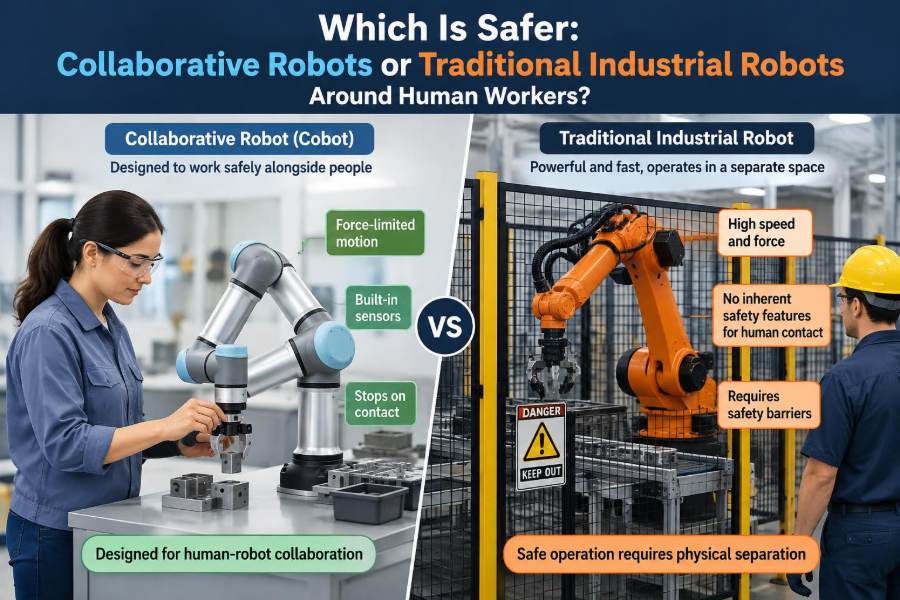

A technician steps into a workcell to clear a misaligned part. Nearby, a robot is waiting for its next command. Whether that moment feels routine or hazardous depends on much more than the label on the robot’s brochure.
Collaborative robots, often called cobots, are designed to work closer to people than conventional industrial robots. That design can reduce certain risks, but it does not make every cobot installation safe by default.
Traditional industrial robots are commonly separated from people by fences, interlocked gates, and carefully designed operating procedures. They may look more intimidating, yet a properly safeguarded conventional cell can be extremely safe during normal production.
The practical question is not simply “cobot or industrial robot?” It is: what hazards exist in this task, and which combination of robot, tooling, controls, layout, and work practices manages them?
🧭 The Short Answer: Safety Depends on the System
Neither category wins automatically. A collaborative robot may be the safer choice for low-force assembly, machine tending, or inspection tasks where workers need frequent access. A traditional industrial robot may be safer when the job involves high speed, heavy payloads, sharp tooling, molten material, or large reach distances.
A robot is only one part of a robot system. The end effector, workpiece, fixtures, conveyors, software, surrounding equipment, and human actions all shape the actual risk.
Calling a robot “collaborative” describes capabilities that can support collaboration. It does not remove the need for an engineered safety assessment.
🤖 What Counts as a Traditional Industrial Robot?
A traditional industrial robot is typically built for speed, repeatability, reach, payload capacity, and continuous production. It may be an articulated arm, SCARA robot, delta robot, cartesian gantry, or another automated mechanism.
These systems are often installed inside a safeguarded space. Physical guards, perimeter fencing, light curtains, safety scanners, pressure-sensitive mats, and interlocked doors prevent people from entering or keep the machine from moving when they do.
The robot itself is not necessarily “unsafe.” Its higher available power and momentum simply mean that separation is often the most reliable risk-control strategy.
🦾 What Makes a Robot Collaborative?
A cobot is designed with features that can enable people and robots to share a workspace under defined conditions. Common features include torque sensing in joints, force monitoring, reduced moving mass, rounded surfaces, speed limits, and safety-rated stopping functions.
Some cobots can detect an unexpected contact and stop or limit force. Others can reduce speed when a person approaches, using safety-rated sensors integrated into the workcell.
These features are useful, but a cobot still has motors, moving links, pinch points, and a tool. A force-limited arm holding a sharp blade, hot part, or heavy casting is not automatically suitable for direct human contact.
⚖️ Why the Robot Label Is Not a Risk Assessment
Risk assessment is the structured process of identifying hazards, estimating how severe and likely harm could be, and selecting controls that reduce risk to an acceptable level. The assessment concerns the complete application, not just the arm.
For example, two identical cobots can present very different risks. One may place lightweight plastic caps into trays. Another may load sharp metal blanks into a press. Their arms are the same, but their hazards are not.
A traditional robot operating behind an interlocked fence can expose workers to less routine risk than an improperly designed cobot station where people constantly reach into a moving workspace.
💥 Force, Pressure, and Impact Are Different Hazards
People often describe cobot safety as “the robot stops when it hits you.” That statement is incomplete. Injury potential depends on the force applied, the pressure concentrated on the body, the impact speed, contact duration, and the body region involved.
Pressure matters because the same force spread across a broad rounded surface is different from force concentrated at a narrow corner. A flat padded surface and a pointed tool tip should never be treated as equivalent.
Impact also differs from quasi-static contact. A moving arm striking a person has momentum. A person trapped between a slowly moving arm and a rigid fixture can face a crushing hazard even when the arm is moving slowly.
🏃 Speed Changes the Safety Picture Quickly
Speed affects stopping distance, impact energy, and the time available for a worker or safety system to respond. At higher speeds, a robot may travel far enough after a stop command that separation becomes necessary.
Collaborative applications often use reduced speeds near people and allow higher speeds when the area is clear. This is called speed and separation monitoring when safety-rated sensing and control functions manage the changing conditions.
Simply lowering a robot’s programmed speed is not always enough. The stop performance, sensor detection zone, approach routes, and possibility of trapping must still be evaluated.
🏋️ Payload and Inertia Can Defeat Good Intentions
A robot’s payload is not just the part it picks up. The moving load includes the gripper, adapters, cables, part, and sometimes residual material or fluid. The farther that mass sits from the robot flange, the more it can increase inertia.
A lightweight cobot carrying a large, awkward panel may create a substantial collision hazard. Likewise, a traditional robot handling a modest item at a controlled speed inside a guarded cell may be easier to protect.
Engineers should assess worst-case conditions, including a dropped part, a mis-gripped component, or a worker encountering the load rather than the robot arm itself.
🧰 End Effectors Often Create the Real Danger
The end effector is the device attached to the robot wrist: gripper, vacuum cup, screwdriver, welding torch, knife, dispenser, sanding tool, or other process tool. It frequently determines whether a collaborative arrangement is practical.
A rounded electric gripper handling soft packaging may be compatible with close human work after assessment. A powered clamp can pinch fingers. A spindle can entangle clothing. A torch introduces heat, fumes, and ignition hazards independent of collision force.
- Check exposed edges, fasteners, jaws, and pinch zones.
- Consider loss of vacuum, air pressure, electrical power, or part retention.
- Include hazards created by the process, such as chips, dust, noise, and hot surfaces.
Tooling safety deserves the same attention as robot motion safety.
🪤 Pinch Points Make “Slow” Unsafe
A pinch point occurs where a person can be caught between moving and fixed objects, or between two moving objects. Common locations include the robot and a fixture, a gripper and a bin wall, or a robot elbow and a nearby machine frame.
Slow motion can actually make a trapping scenario more dangerous if the robot continues applying force after contact. A worker may not be able to pull away, especially if a hand or finger is caught.
Good cell design removes reachable trapping zones where possible. Where it cannot, safeguards, clearance distances, restricted paths, or protective devices may be needed.
🧱 Cell Layout Determines Where People Can Be Hurt
Robot paths are not the only issue; approach paths matter too. A worker needs a predictable, uncluttered route to load materials, inspect output, refill supplies, and leave the area quickly.
A poorly arranged collaborative cell may force workers to reach around the arm, lean across a conveyor, or work between the robot and a fixed table. These awkward interactions increase exposure and may encourage shortcuts.
Designing for safety includes ergonomics. Comfortable reach zones, clear sightlines, suitable working heights, and organized material flow reduce both strain and unexpected movement around the robot.
👁️ Sensors Help Only When Their Coverage Is Real
Safety-rated laser scanners, vision systems, light curtains, and other presence-sensing devices can reduce robot speed or trigger a stop when a person enters a defined area. Their value depends on correct placement, configuration, validation, and maintenance.
A scanner cannot protect a route it cannot see. Pallets, carts, fixtures, and accumulating boxes can create blind spots or change the protected field. Reflective surfaces and environmental conditions may also affect some technologies.
Sensor-based protection should be designed around realistic worker behavior, including where someone may stand while recovering a part or talking to a colleague.
🚧 Physical Guarding Is Still a Powerful Control
Fences and barriers are sometimes treated as evidence that a robot is old-fashioned or less advanced. In reality, physical separation is often a straightforward and dependable way to prevent access to a hazardous motion area.
Traditional robot cells commonly use interlocked gates. Opening a gate initiates a safety function that stops hazardous motion, while restart procedures help prevent unexpected movement when a person is still inside.
Guarding can also be useful around cobots. A hybrid arrangement may allow human access to a low-risk loading zone while enclosing a hazardous downstream operation, such as a press, cutter, or high-speed transfer mechanism.
🛑 Stopping Is Not the Same as Being Safe
Robots use different stopping functions. Some stops remove power to the motors; others keep power available so the robot can hold position or restart more efficiently. The appropriate function depends on the hazard and the safety architecture.
Every system has a stopping distance. It includes the time for sensing, signal processing, control response, braking, and mechanical coast. A fast-moving robot may not stop exactly where an operator expects.
Safe restart matters too. After a protective stop, workers must know why it happened, verify that the area is clear, and restart through a deliberate procedure. Automatic restart can be hazardous in many circumstances.
🧑🏭 Collaboration Has Several Different Modes
Human-robot collaboration is not one operating condition. Industrial safety practice commonly distinguishes several approaches, each suitable for different tasks and risks.
| Collaborative approach | Basic idea | Typical use |
|---|---|---|
| Safety-rated monitored stop | The robot stops while a person shares the space. | Inspection, part loading, adjustments. |
| Hand guiding | A worker manually guides the robot using an enabling control. | Teaching positions, moving a tool into place. |
| Speed and separation monitoring | Robot speed changes as people approach. | Shared material flow and open work areas. |
| Power and force limiting | Contact forces are limited for defined interactions. | Low-force assembly and careful handling. |
A cell may use more than one approach. The key is to define when each mode applies and what hazards remain in that mode.
✋ Hand Guiding Needs Deliberate Controls
Hand guiding allows an operator to move a robot manually, usually by holding a dedicated control or the robot tool. It can make teaching easier, particularly for small-batch work where conventional programming would be slow.
However, hand guiding is not casual physical contact. It should use an appropriate enabling device, controlled speed, clear operating procedures, and awareness of surrounding obstacles.
The worker must not be pulled into a collision zone by the robot, tool cable, or load. Hand guiding a robot near a sharp fixture or a machine opening can still create serious hazards.
🔧 Programming Changes Can Change Safety Too
Robot programs evolve. A programmer may add a waypoint, increase a speed setting, change a gripper, or alter a recovery sequence to improve cycle time. Each change can affect the assumptions used in the original risk assessment.
For example, moving a robot path closer to a table edge can create a new trapping zone. Replacing a vacuum cup with a mechanical gripper can introduce pinch hazards and different failure modes.
Organizations need change control: review changes, update safety documentation where needed, test the revised cell, and communicate new operating instructions before routine use resumes.
🧠 Human Factors Can Undermine Good Engineering
Workers learn how a cell behaves over hundreds of cycles. If the process is slow, unreliable, or difficult to access, people may bypass intended steps to keep production moving. That is a design signal, not merely an individual failure.
Clear indicators, understandable fault messages, accessible emergency stops, and practical recovery procedures help people make safer decisions under pressure. Training should explain the reason behind restrictions, not only list rules.
Supervisors also need to distinguish between a nuisance stop and a warning that the workstation layout or operating procedure needs improvement.
🦺 Maintenance Is a Different Safety Scenario
Normal production is not the only state to assess. Maintenance, cleaning, setup, calibration, fault recovery, and troubleshooting often place people closer to robot hazards than ordinary operation does.
These tasks may involve stored energy from electricity, pneumatic pressure, gravity, springs, or suspended loads. Isolation procedures, lockout or tagout practices where applicable, and verification of a safe state are essential controls.
A cobot’s low-force collaboration mode does not necessarily protect a maintenance worker working inside a larger automated line with conveyors, tooling, and other machines.
📜 Standards Provide a Framework, Not a Preapproved Design
Robot safety work is often guided by standards and regulations applicable to the country, industry, and workplace. Commonly referenced robot safety standards include the ISO 10218 series, while ISO/TS 15066 is widely associated with collaborative robot applications.
These documents help structure thinking about safeguards, operating modes, validation, and collaborative contact. They do not mean that buying a robot advertised as compliant makes every possible installation compliant or safe.
Local legal requirements, machine integration responsibilities, and employer procedures may add further obligations. When the application is complex, qualified safety and automation professionals should be involved early.
🏭 When a Cobot Can Be the Better Choice
Cobots are often well suited to tasks that require frequent human access, flexible product handling, and modest forces. Consider a hypothetical electronics workstation where an operator places a housing in a fixture while a cobot inserts lightweight fasteners using a controlled electric screwdriver.
If the screwdriver, fixture, motion paths, and approach areas are designed properly, the cobot can reduce repetitive reaching while letting the operator retain tasks requiring judgment, visual inspection, or delicate handling.
Other promising applications include low-force dispensing, labeling, camera inspection, small-part packaging, and collaborative material presentation. Each still requires assessment of tooling, dropped objects, and reachable pinch points.
🏗️ When a Traditional Robot Is the Safer Choice
Traditional industrial robots are often the better safety choice for fast palletizing, heavy lifting, welding, die casting, high-speed picking, abrasive finishing, or handling sharp and unstable materials. In these cases, physical separation is usually more practical than attempting close collaboration.
Imagine a robot rapidly stacking loaded cartons. Even if a person could theoretically work nearby, the moving load, reach envelope, and falling-object potential make a fenced cell with defined entry procedures a sensible solution.
High output does not automatically require a traditional robot, but high energy and severe process hazards often require robust separation.
🔀 Hybrid Cells Often Offer the Best Balance
Many effective factories use both approaches in one system. A worker may load components at an ergonomically designed station, while a conventional robot performs high-speed transfer behind guarding. A cobot may then present finished parts for inspection outside the hazardous zone.
This division assigns people and machines work that suits their strengths. Humans handle judgment, variation, and quality decisions; robots handle repeatable motion, heavy handling, or exposure to unpleasant processes.
The boundary between zones must be clear. Workers should understand which space is collaborative, which is restricted, and what happens when a protective device is triggered.
🔍 Validation Tests the Installed Reality
Validation checks whether installed safety measures perform as intended, rather than merely appearing correct on drawings. It can include testing stop functions, interlocks, sensing coverage, safety logic, access points, and mode transitions.
Testing should account for realistic conditions: the largest planned part, the heaviest tool, normal lighting, accumulated materials, and the actual routes workers use. A system can behave differently after a fixture is moved or a cart is parked nearby.
Documenting tests and settings also makes future troubleshooting safer. It gives teams a baseline when software, tooling, or production demands change.
🚨 Emergency Stops Are a Last Line of Defense
An emergency stop is meant for urgent situations, not ordinary cycle control. It should be accessible, recognizable, and supported by procedures that explain what happens next.
Pressing an emergency stop may halt motion, but it does not automatically solve every hazard. A suspended load may need mechanical support, a hot tool may remain hot, and stored pneumatic energy may still exist.
The safer strategy is to prevent foreseeable hazardous contact through design. Emergency stops are essential, but they should not be the primary plan for routine human-robot interaction.
📋 Questions to Ask Before Choosing a Robot Type
Before selecting a cobot or conventional industrial robot, define the task in terms of hazards and workflow rather than marketing categories. Useful questions include:
- What can the robot, tool, and workpiece strike, pinch, cut, burn, or drop?
- How close must workers be during normal operation, setup, and recovery?
- What are the maximum speed, payload, reach, and stopping-distance requirements?
- Could a person be trapped against a fixture, machine, wall, or conveyor?
- What happens after a sensor fault, power loss, gripper failure, or unexpected stop?
- Will likely future changes alter tools, products, paths, or cycle speeds?
Answers to these questions often reveal that the right answer is a guarded robot, a collaborative robot, or a deliberately designed combination of both.
⚠️ Common Misconceptions That Create Risk
“Cobots do not need guarding.” Some cobot applications need no physical barrier around the arm, but others need partial guarding, sensing, or complete separation because of tooling and process hazards.
“Traditional robots are unsafe around people.” A properly safeguarded conventional robot can be very safe because it prevents routine exposure to dangerous motion.
“A safety sensor solves every problem.” Sensors can fail, be blocked, be misconfigured, or leave blind areas. They are one layer in a system that also needs thoughtful mechanical design and safe procedures.
“Slower always means safe.” Slow movement can still trap, crush, or push someone into another hazard.
🧩 The Core Principle: Control the Hazard, Not the Label
Collaborative robots expand the ways automation can be placed near people. Traditional robots remain essential where power, speed, payload, or process hazards make separation the wiser control. The safer option depends on the actual task and the quality of the implementation.
A sound design starts by reducing hazards at the source, then adds safeguards, safety-rated controls, clear procedures, training, and validation. It also considers abnormal conditions, not just the ideal production cycle.
The best question for a project team is not “Can people work beside this robot?” It is “Under exactly what conditions can people perform their work without being exposed to unacceptable risk?”
Collaborative and traditional robots can both be safe around workers when the entire cell is designed, assessed, validated, and operated for the hazards that are truly present. 🦾🦺⚙️