
A robot can look perfect on installation day. It powers up, runs a demonstration cycle, picks a part, and places it exactly where everyone expects.
Then production begins. A tool is changed, a fixture is bumped, the temperature rises through a long shift, or a replacement component is fitted during a repair. Suddenly, the same robot is placing parts a few millimetres off target, applying adhesive unevenly, or approaching a safety boundary more closely than planned.
The robot may not be “broken” in the obvious sense. Its motors can still move, its controller can still run the program, and its end effector can still do its job. What has changed is the relationship between the robot’s internal coordinate system and the real cell around it.
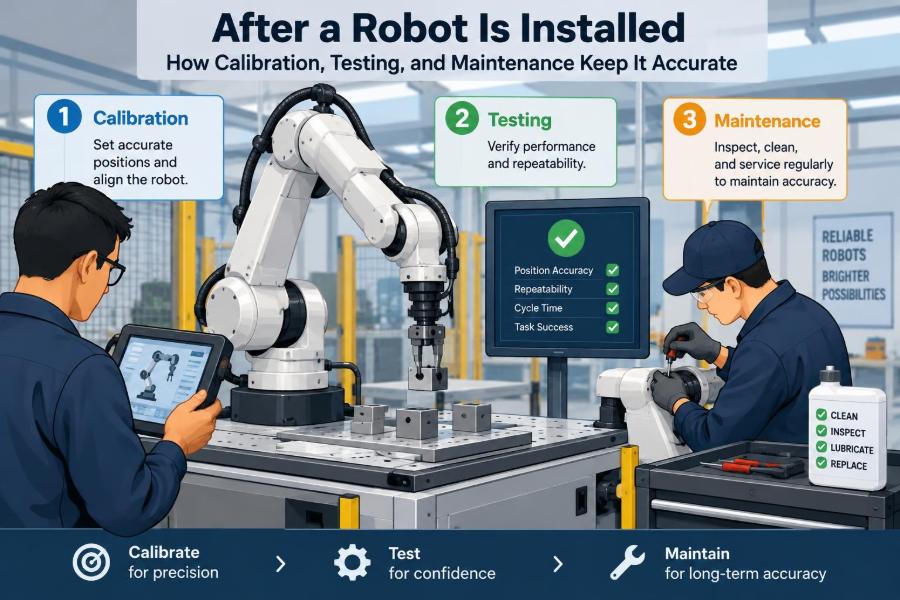
That is why installation is the beginning of a robot’s accuracy life, not the end. Calibration, testing, monitoring, and maintenance keep the programmed motion connected to physical reality.
🏭 Installation Creates a Starting Point, Not a Permanent Result
Commissioning establishes a baseline: the robot base is positioned, tools are defined, safety devices are checked, and the process is tuned. At that moment, the cell has a known configuration.
But industrial and service environments change. Fasteners settle, fixtures wear, sensors drift, payloads vary, and people make adjustments. Accuracy must therefore be managed as an ongoing operating condition rather than assumed from the original setup.
🎯 Accuracy Has More Than One Meaning
People often use accuracy to mean “the robot goes where it was programmed to go.” In practice, several performance measures matter, and they are not interchangeable.
| Measure | What it describes | Why it matters |
|---|---|---|
| Position accuracy | How close the robot reaches a commanded physical point | Critical for fitting, drilling, dispensing, and inspection |
| Repeatability | How consistently it returns to the same point | Essential for repetitive production tasks |
| Path accuracy | How closely motion follows the intended route | Matters in welding, cutting, painting, and sealing |
| Process accuracy | Whether the completed task meets requirements | Captures the combined effect of robot, tool, part, and process |
A robot can be highly repeatable but poorly accurate. For example, it may return to the same slightly wrong location every cycle. That consistency can hide a calibration problem until it creates defective parts.
🧭 Coordinate Frames Connect Code to the Cell
A robot controller does not naturally understand “the left edge of the fixture” or “the centre of the hole.” It calculates positions through coordinate frames: mathematical reference systems attached to the robot base, a tool, a workpiece, or a user-defined area.
If a work-object frame is shifted by 3 mm, every point taught relative to it may be shifted. Understanding frames is fundamental because many apparent motion faults are actually reference-definition faults.
🦾 The Tool Center Point Defines the Working Tip
The tool center point, usually shortened to TCP, is the point on an end effector that the controller treats as the tool’s functional tip. It might be a gripper’s grasp point, a welding wire tip, a suction cup centre, or a dispensing nozzle outlet.
Changing a tool, loosening a mount, bending a bracket, or entering a TCP incorrectly changes where the robot believes its tool is. A small TCP error becomes especially visible when the robot approaches a feature from different angles.
📍 Base and Work Frames Must Be Verified Separately
The base frame describes where the robot itself sits. The work frame describes where the task exists: a fixture, conveyor station, pallet, or machine opening. They solve different problems and should not be treated as one setting.
If the robot pedestal moves, base-frame assumptions may be affected. If a fixture is repositioned, the work frame is more likely to need correction. Separating these causes makes troubleshooting much faster.
🔩 Mechanical Stability Comes Before Software Correction
Calibration cannot compensate responsibly for loose anchors, a cracked tool bracket, backlash in a worn gearbox, or a fixture that shifts under clamping force. Software may mask the symptom temporarily while the physical cause continues to worsen.
Before retouching points, inspect the mechanical chain from floor to part. Check base fasteners, robot mounting, flange condition, tool hardware, locating pins, clamps, and the condition of the part presentation system.
🌡️ Temperature Changes Geometry
Metal structures expand and contract with temperature. In a typical cell, motors warm up, process equipment generates heat, and ambient conditions change between seasons or shifts.
Many applications tolerate these small changes. Tight-tolerance work, long tools, large fixtures, and precision measurement tasks may not. A useful practice is to calibrate and validate under conditions that resemble normal operation, not only during a cool, idle startup.
⚖️ Payload Data Influences Motion Quality
The controller uses payload mass, centre of gravity, and inertia information to calculate how the robot accelerates and decelerates. Incorrect values can lead to poorer path performance, vibration, excessive following error, or protective faults.
Payload verification is especially necessary after changing grippers, adding a camera, installing a larger weld gun, or altering the number of parts carried. The issue is not merely whether the robot can lift the load; it is whether it can control that load safely and predictably.
🧰 Calibrating the Robot’s Own Axes
Axis calibration relates encoder readings to the physical angular or linear positions of robot joints. Manufacturers use different procedures, often involving witness marks, mechanical references, or specialised service tools.
This is not routine point teaching. Axis mastering or calibration may be required after certain repairs, encoder issues, motor replacement, collision damage, or battery-related position loss, depending on the robot design. Follow the manufacturer’s documented method because an incorrect axis reference can affect the entire workspace.
📐 Calibrating Tools With Real Measurements
A TCP can be estimated from drawings, but a measured calibration is often better because it captures the assembled tool as installed. Common methods move the tool around a fixed reference point from several orientations so the controller calculates the offset.
Good results depend on a rigid reference, careful orientation changes, and a tool that does not flex. If a long nozzle bends under contact or a gripper has play in its wrist adapter, repeated calibration may produce inconsistent results rather than a trustworthy TCP.
🧩 Teaching a Workpiece Frame
A workpiece frame is usually established from known features such as an origin point and directions that define its axes. The selected features should be physically meaningful, accessible, and stable over repeated loading cycles.
For example, a machined locating corner and two hardened datum pins are better references than an easily scratched painted edge. The goal is not simply to complete a teaching routine; it is to create a reference that represents how the part is actually located.
👁️ Vision Systems Need Their Own Calibration
Robot vision adds another coordinate system: the relationship between camera pixels, camera position, the robot, and the work surface. A camera mounted to a fixed stand requires different calibration from a camera mounted on the robot wrist.
Lens changes, camera movement, focus adjustments, lighting changes, and replacement hardware can all affect performance. A vision system can identify an object consistently yet still deliver an inaccurate physical pick location if its robot-to-camera transformation is wrong.
📏 Measurement Systems Should Be Trusted, Not Assumed
Dial indicators, gauges, laser trackers, calibration plates, cameras, and test artefacts are only useful when their condition and method suit the measurement. An inaccurate reference creates a misleadingly precise adjustment.
For critical work, teams should define what instrument is used, how it is checked, what setup is required, and who is authorised to accept the result. This turns validation from an opinion—“it looks right”—into a repeatable process.
✅ Testing Should Follow a Planned Sequence
A sensible post-installation or post-maintenance test sequence moves from low-risk checks to full production conditions. Beginning immediately at high speed makes it harder to isolate faults and increases the consequence of a bad assumption.
- Inspect mechanical condition and verify safety devices.
- Confirm frames, tool data, payload data, and I/O signals.
- Run single motions and slow dry cycles with clearance checks.
- Test representative parts or process samples.
- Increase speed and production load in controlled stages.
- Record the accepted baseline results.
The exact procedure should reflect the application and site safety rules, particularly where robots share space with people or other moving equipment.
🐢 Slow-Speed Dry Runs Reveal Basic Errors
Dry runs use program motion without the full process, or with risk-reducing conditions such as empty grippers and disabled dispensing. They help reveal unexpected approach angles, frame errors, singularity risks, and clearance problems.
Slow speed is not a substitute for formal safety validation. It is a diagnostic tool that gives technicians time to observe motion and stop before a small setup error becomes equipment damage.
🔬 Process Validation Is More Than Reaching a Point
A robot may reach the correct coordinates while the process still fails. A welding torch can have the right TCP but poor wire presentation. A dispensing nozzle can follow the path but deliver an inconsistent bead. A gripper can arrive correctly but grip an oily or warped part unreliably.
Validate the output that matters: bead shape, fastener seating, pick success, hole location, surface coverage, inspection result, or cycle completion. This is why process accuracy is often the metric production teams care about most.
📊 Establish a Baseline Before Drift Becomes Invisible
Record meaningful reference values while the cell is known to be healthy. These might include a measured touch-off point, vision offset, path check result, torque trend, cycle time, force reading, or sample-process result.
Later measurements are easier to interpret when compared with a baseline. Without one, teams may know that quality has changed but not whether the shift is new, gradual, or within normal variation.
📈 Trend Data Instead of Waiting for a Failure
Condition monitoring uses repeated observations to spot change over time. It does not require a complex predictive-maintenance platform to be useful; a disciplined log of recurring checks can reveal a developing issue.
Watch for patterns such as growing vision corrections, increasing retry attempts, worsening vibration, longer settling times, repeated overload alarms, or gradual changes in process results. A trend is a prompt to investigate, not automatic proof of one specific failure.
🔔 Alarms Are Clues, Not Diagnoses
Robot alarms communicate what the controller detected: excessive following error, a communication loss, a torque limit, a safety stop, or another abnormal condition. They rarely identify every underlying cause on their own.
For instance, a collision-related alarm could result from a shifted fixture, incorrect part loading, a wrong frame, a damaged tool, or an edited path. Resetting the alarm and restarting without finding the cause can repeat the event and obscure useful evidence.
🧹 Preventive Maintenance Protects Accuracy
Preventive maintenance is scheduled work intended to reduce avoidable deterioration. It commonly includes cleaning, inspecting cable dress packs, checking fasteners, examining end effectors, replacing consumable components, and reviewing lubrication requirements specified by the manufacturer.
Contamination deserves attention. Dust, weld spatter, adhesive buildup, coolant, and abrasive particles can affect sensors, grippers, connectors, cable movement, and vision optics long before they stop the robot completely.
🔌 Cables, Hoses, and Dress Packs Need Attention
Robot dress packs experience repeated bending and twisting. Over time, cables can chafe, hoses can kink, connectors can loosen, and routing can interfere with motion.
These faults often appear intermittent: a camera drops out only at one wrist angle, a pneumatic gripper slows during a certain move, or a signal flickers under vibration. Inspecting the robot throughout its range, with appropriate safety controls, is more revealing than checking only the home position.
🧼 End Effectors Wear Where the Work Happens
The end effector is closest to the part and often absorbs the harshest conditions. Gripper fingers wear, suction cups harden, nozzle tips clog, cutters dull, and compliance devices lose adjustment.
Maintenance should focus on the actual failure modes of the tool. A vacuum pick system may need leak checks and cup inspection, while a mechanical gripper may need jaw alignment, sensor confirmation, and wear checks at contact surfaces.
💥 Collisions Require More Than a Visual Check
After a collision, a cell can appear normal while a tool mount is slightly bent, a fixture has shifted, a cable is damaged internally, or a robot axis has experienced abnormal load. The correct response depends on severity, equipment type, and the manufacturer’s guidance.
At minimum, investigate why the collision occurred, inspect affected hardware, verify frames and TCP, and revalidate the relevant path and process. Do not assume that clearing an alarm restores the original geometry.
📝 Change Control Preserves Hard-Won Setup Knowledge
Many accuracy problems begin with an undocumented change: a replacement gripper installed with a slightly different adapter, a fixture shim added during a rush repair, or a program point adjusted to solve one part issue.
Use clear change records that state what changed, why, who approved it, what calibration was performed, and what testing confirmed acceptance. Back up robot programs and parameter sets before edits. This makes recovery possible and prevents later teams from treating a deliberate correction as a mystery.
👥 Clear Roles Prevent Calibration Confusion
Reliable robot cells depend on coordination among operators, maintenance technicians, controls engineers, quality personnel, and safety specialists. Each group sees different evidence: operators notice changed behaviour, maintenance finds wear, engineers manage frames and logic, and quality verifies output.
Define who may adjust taught points, who may alter safety-related settings, who signs off process validation, and when the equipment must be escalated. Unclear authority can lead to well-intended changes that conflict with each other.
🛡️ Safety Validation Must Accompany Accuracy Work
An accurate robot is not automatically a safe robot. Changes to tools, payloads, motion paths, workspaces, scanners, interlocks, or cell layout can affect hazards even if production quality improves.
Use the applicable risk assessment, lockout procedures, safeguarded-space rules, and site requirements whenever calibration or testing requires people to enter or work near the cell. Safety functions should be tested by competent personnel using approved methods; this article cannot replace manufacturer documentation or local safety obligations.
🔄 Recalibration Should Be Triggered by Events
Calendar-based checks are useful, but event-based triggers are equally valuable. Recalibration or verification should be considered after a collision, tool replacement, fixture relocation, major repair, encoder-related fault, unusual quality shift, or repeated offset correction.
The right interval depends on process tolerance, environmental severity, equipment history, and the consequence of an error. A robust high-volume assembly cell may justify frequent automated checks, while a lower-demand handling cell may rely on periodic verification and clear event triggers.
🤖 Design Cells So They Can Be Checked Easily
Maintainability begins during cell design. Provide access to reference features, use durable datum locations, leave room to inspect tools, route cables thoughtfully, and make routine checks possible without dismantling half the station.
Simple design choices can reduce downtime later. A protected calibration pin, a repeatable quick-change tool interface, or a fixed vision target can make verification faster and less dependent on individual memory.
🚫 Common Shortcuts That Create Long-Term Problems
Several shortcuts feel efficient when production pressure is high but create fragile systems:
- Retouching individual points before checking the TCP or work frame.
- Using a software offset to hide a loose fixture or bent tool.
- Copying calibration values from a similar tool without measuring the installed one.
- Resetting recurring faults without recording conditions and investigating causes.
- Skipping production-like validation after a repair.
- Letting multiple people edit programs without version control.
These practices trade a short interruption for longer, harder-to-diagnose instability. A structured check is usually faster than repeated reactive adjustments.
🧠 A Practical Troubleshooting Logic
When a robot misses a target, start with the broadest, most likely physical causes before editing motion points. Ask whether the part is correctly located, the tool is intact, the reference frames are valid, and the problem occurs consistently or only under certain conditions.
A useful distinction is this: if every point is displaced similarly, suspect a frame, fixture, or base-related issue. If errors vary with orientation, suspect TCP definition, tool flex, or mechanical compliance. If the robot reaches points but output quality changes, inspect the process and end effector.
🌱 The Core Principle: Keep Digital Instructions Aligned With Reality
A robot program is a digital model of a physical cell. Calibration keeps reference frames and tool definitions aligned with the real machine. Testing checks that planned motion produces the intended result. Maintenance prevents gradual physical changes from breaking that alignment.
The most reliable approach is not to calibrate endlessly or to maintain every component at the same interval. It is to use stable mechanical design, meaningful baselines, event-based verification, documented changes, and process-focused acceptance checks.
Robotic accuracy is sustained when teams continuously verify that the robot’s internal model still matches the physical world it works in. That discipline turns a successful installation into dependable long-term performance. 🦾📏🔧