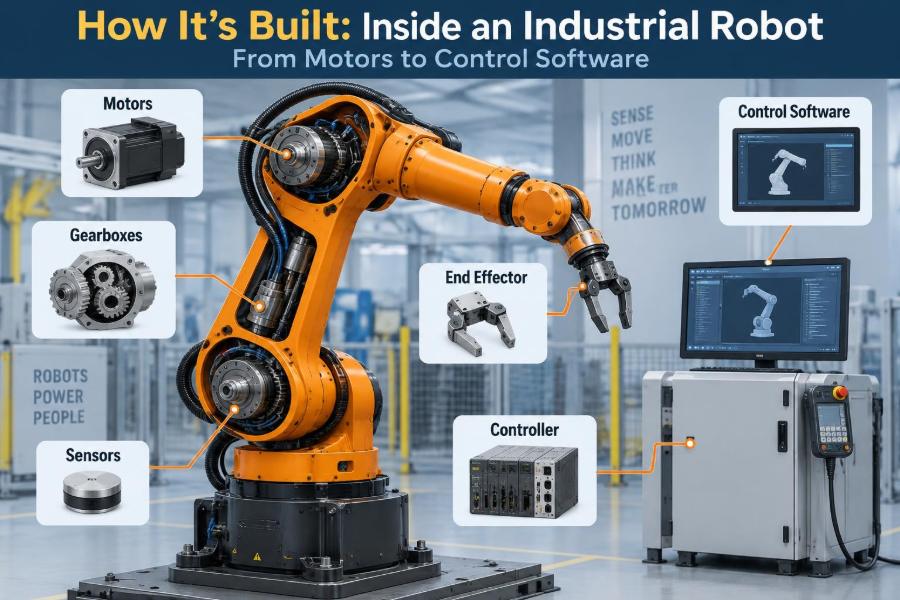

A robot arm on a factory floor can look deceptively simple. It picks a metal bracket, places it in a fixture, and repeats the same arc thousands of times while people, conveyors, and machines work around it.
Yet that smooth motion is the visible result of a tightly connected engineering system. Electric motors create torque, gearboxes reshape it, sensors report position, a controller plans motion, and safety hardware decides when motion must stop.
Understanding that chain matters whether you are selecting a robot cell, troubleshooting a missed pick, writing a program, or deciding which engineering discipline to pursue. A fault that appears to be “a robot problem” may actually begin in mechanics, wiring, calibration, software, or process design.
Let’s follow an industrial robot from its physical structure to the control software that makes it useful.
🏭 What Counts as an Industrial Robot?
An industrial robot is a programmable, automatically controlled machine designed to move materials, tools, or parts through defined motions. The familiar six-axis articulated arm is only one form; industrial robots also include SCARA robots, delta robots, Cartesian gantries, and collaborative robot arms.
What separates a robot from a simple automated mechanism is its combination of programmable motion, feedback, and reusability. A fixed cam mechanism may perform one motion very well. A robot can be taught or programmed to perform many related motions within its mechanical limits.
The arm itself is not the whole system. In a working cell, the robot is connected to an end effector, controller, safety system, fixtures, sensors, material-handling equipment, and often a programmable logic controller, or PLC.
🧩 The Robot Cell Is a System, Not Just an Arm
Consider a hypothetical machine-tending cell. A robot removes a part from a tray, loads it into a CNC machine, waits for machining to finish, unloads the part, and places it onto an inspection station.
For that cycle to work, the robot needs more than accurate joints. It must receive signals showing that the machine door is open, the fixture is ready, the gripper has a part, and the area is safe to enter. It must also send signals that allow the next machine step to begin.
This systems view explains a common commissioning lesson: improving robot speed does not necessarily improve cell throughput. The bottleneck may instead be gripper actuation, fixture clamping, vision processing, machine cycle time, or a conservative safety sequence.
🦴 Links, Joints, and Degrees of Freedom
The rigid structural segments of an articulated robot are called links. The moving connections between them are joints, often called axes in industrial settings. A common arm has six axes, allowing it to position and orient a tool in three-dimensional space.
Degrees of freedom describe the independent motions available. A tool needs three translational freedoms to move in X, Y, and Z, plus three rotational freedoms to control its orientation: roll, pitch, and yaw.
More axes can increase flexibility, especially when avoiding obstacles or maintaining a tool angle. They also add cost, mass, control complexity, and additional locations where backlash, wear, or cable-routing problems can occur.
📐 Robot Geometry Defines Where It Can Reach
A robot’s reach is not a simple sphere around its base. Link lengths, joint travel limits, mechanical interference, and wrist orientation create an irregular workspace, the volume and set of orientations the tool can physically achieve.
A point may be within nominal reach but still be inaccessible with the required tool angle. For example, a welding torch may reach a seam location but cannot approach it without colliding with a fixture or exceeding a wrist-axis limit.
Engineers therefore evaluate the full task, not just the distance from robot base to part. Tool length, cable dress pack, gripper opening, fixture geometry, and clearance during approach and retreat all affect whether a target is practical.
🏗️ The Base and Arm Carry Real Mechanical Loads
The base anchors the robot and transmits forces into the floor, pedestal, wall mount, or overhead structure. It must resist not only static weight but also dynamic loads created when the arm accelerates, brakes, or changes direction.
At high speed, an arm behaves less like a desk lamp and more like a moving mechanical structure with inertia. A poorly designed support can vibrate, reduce placement accuracy, loosen fasteners, or trigger faults as the robot’s servo system fights unwanted motion.
Payload ratings deserve careful reading. The rated payload usually refers to a mass limit under specified conditions, but tool center-of-gravity distance and inertia are equally significant. A light but long tool can create a demanding turning load on the wrist.
⚡ Servo Motors Turn Electrical Power into Motion
Most articulated industrial robots use electric servo motors, commonly brushless AC motors. Unlike a basic motor that simply spins when power is applied, a servo axis continuously compares commanded motion with measured motion and corrects the difference.
Motor torque is what creates rotational force at a joint. Torque requirements rise when an axis must accelerate a heavy load, hold an extended arm against gravity, or resist process forces such as drilling, dispensing, or polishing.
Each axis may behave differently. The large shoulder joint often needs substantial torque because it moves multiple downstream links. A wrist joint usually moves less mass, but it may need high speed for tool orientation or coordinated motion.
⚙️ Gearboxes Trade Speed for Joint Torque
Motors alone generally do not provide the torque and compact packaging needed at robot joints. A reduction gearbox lowers output speed while multiplying available torque, much like selecting a lower gear on a bicycle makes climbing easier.
Common robot transmission designs include harmonic drives, cycloidal reducers, and planetary gearboxes. Their suitability depends on torque capacity, ratio, stiffness, size, backlash, durability, and the required motion profile.
No transmission is perfectly rigid. Under load, components twist slightly, and clearances can contribute to lost motion. The controller can compensate for some predictable effects, but worn or damaged gearboxes can produce accuracy problems that software alone cannot solve.
🧭 Encoders Tell the Controller Where Each Axis Is
Every controlled joint needs position feedback. An encoder measures rotation and sends position information back to the servo drive or controller. This feedback closes the loop between desired and actual motion.
Absolute encoders retain or identify a known position reference, while incremental encoders report changes in position and may require a homing process after power loss. Actual implementations vary by robot design and safety architecture.
Encoder resolution should not be confused with complete robot accuracy. A joint can be measured in very fine increments while the tool position is still affected by gearbox compliance, arm deflection, temperature, calibration quality, and mounting conditions.
🔁 Closed-Loop Control Corrects Motion Continuously
In closed-loop control, the system commands a joint position or velocity, reads encoder feedback, calculates error, and adjusts motor output. This cycle occurs repeatedly at high speed, allowing the robot to track a planned trajectory rather than merely hoping it reaches the target.
A common control concept is PID control: proportional, integral, and derivative terms respond to present error, accumulated error, and the rate of change. Real industrial servo systems often include additional filters, feedforward terms, current loops, and manufacturer-specific tuning methods.
Control tuning is a compromise. An overly aggressive response can excite vibration or overshoot. A response that is too soft can lag behind the path, especially under changing payloads or process forces.
🔋 Servo Drives Manage Current, Velocity, and Torque
A servo drive is the power-electronics layer between the controller and motor. It converts incoming electrical power into carefully controlled motor current, because motor current is closely related to produced torque.
The drive typically manages fast inner control loops while receiving higher-level targets from the robot controller. It also monitors conditions such as overcurrent, overheating, encoder faults, and communication loss.
When investigating an axis fault, distinguish the controller’s command from the drive’s ability to execute it. A path-planning issue, a loose feedback cable, a motor brake problem, and a drive fault can all stop the same axis for very different reasons.
🛑 Brakes Hold Position When Power Is Removed
Many robot joints include spring-applied, electrically released brakes. During normal operation, electrical power releases the brake. If power is removed, the spring applies it so gravity does not allow an elevated arm to fall freely.
A brake is primarily a holding and safety-related device, not a precision motion-control element. It should not be treated as a substitute for controlled deceleration, and its performance can be affected by wear, contamination, or incorrect adjustment.
Maintenance procedures around brakes require special care. Releasing a brake manually on a loaded axis can allow unexpected movement; follow the robot manufacturer’s procedure and the site’s lockout and energy-control rules.
🧠 The Robot Controller Is the Motion Coordinator
The controller is the robot’s dedicated computing and control cabinet. It runs motion algorithms, interprets robot programs, coordinates axes, manages input/output signals, records diagnostics, and communicates with other equipment.
It converts a programmer’s instruction such as “move the tool to this pose” into coordinated joint commands. The controller must ensure that all axes arrive in a way that creates the intended tool path, rather than having each motor move independently.
Modern controllers may also host vision interfaces, fieldbus communication, simulation data, safety functions, and production logging. Even so, a controller does not eliminate the need for a clear cell design and well-defined interfaces.
🗺️ Forward and Inverse Kinematics Connect Joints to Tool Motion
Forward kinematics calculates the tool position and orientation from known joint angles. If the controller knows every axis position and the arm geometry, it can estimate where the tool center point is in space.
Inverse kinematics works in the opposite direction: given a desired tool pose, it calculates joint positions that could produce it. This can be challenging because a robot may have multiple valid configurations, or none that meet joint limits and collision constraints.
Think of reaching for a cup. You can approach with your elbow high or low, but a crowded shelf may make only one posture feasible. Robot configuration choices similarly affect clearance, cable twist, cycle time, and singularity risk.
📍 The Tool Center Point Makes Motion Meaningful
The tool center point, or TCP, is a defined point on the end effector used for programming and motion calculations. On a gripper, it may be between the fingers; on a welding torch, it may be at the wire tip; on a dispenser, at the nozzle outlet.
If the TCP is entered incorrectly, a robot may rotate accurately at its wrist while the real tool tip traces an unexpected arc. That can lead to crooked sealant beads, poor weld placement, or collisions near a fixture.
TCP calibration is therefore a foundational setup task. Good practice verifies it with simple motions from several orientations before relying on it for a close-clearance process.
🧰 End Effectors Turn Motion into Useful Work
The end effector is the device mounted to the robot wrist that interacts with the world. It may grip, weld, cut, inspect, dispense, sand, fasten, palletize, or perform another process.
Grippers can be pneumatic, electric, hydraulic, magnetic, vacuum-based, or purpose-built mechanical devices. Selection depends on part geometry, surface condition, payload, required gripping force, cycle time, cleanliness, and failure behavior.
A gripper should be designed for uncertainty, not just an ideal CAD model. Parts can vary slightly, trays can shift, surfaces can be oily, and vacuum cups can leak. Reliable cells use sensing or mechanical features to detect and manage these conditions.
🌡️ Process Forces Change Robot Behavior
Pick-and-place tasks are often dominated by inertia and positioning. Processes such as milling, grinding, deburring, and polishing add sustained external forces that can deflect the arm and challenge path accuracy.
Forces also travel back through the tool, wrist, joints, and mounting structure. An application may need a force-torque sensor, compliant tool, specialized high-stiffness robot, or a different machine architecture altogether.
Do not assume a robot rated to carry a tool can perform every process that tool might perform. Payload capacity, stiffness, allowable moments, speed, environmental sealing, and path-quality requirements must be evaluated together.
👁️ Sensors Let the Cell Detect Reality
Encoders tell the controller what the robot joints are doing, but external sensors tell the cell what is happening around the robot. Typical examples include photoelectric part sensors, pressure switches, barcode readers, cameras, proximity sensors, and force sensors.
Vision systems can locate parts whose position varies, inspect features, or guide picking. Their success depends on lighting, contrast, lens selection, calibration, part presentation, and the time available for image processing.
A sensor signal is not automatically truth. A photoelectric sensor can be blocked by dust, a camera can be fooled by reflections, and a vacuum switch may respond differently to a porous part. Robust automation anticipates plausible failure modes.
🔌 Industrial Networks Carry Commands and Status
Robots exchange information with PLCs, drives, safety devices, vision systems, and manufacturing software through industrial communication networks. The specific protocol depends on the equipment and plant architecture.
At the cell level, communication often uses a disciplined handshake. For example, a machine may indicate “ready,” the robot indicates “request entry,” the machine confirms permission, and the robot later signals “cycle complete.”
Clear signal definitions prevent vague integrations. Every signal should have a name, direction, meaning, normal state, fault behavior, and timing expectation. A single ambiguous “busy” bit can create difficult intermittent faults.
🧱 PLCs Orchestrate the Wider Machine Sequence
A PLC is often the coordinator for conveyors, valves, machine interlocks, stack lights, and cell-level sequencing. The robot controller specializes in motion, while the PLC commonly manages the broader production logic.
The boundary between PLC and robot responsibilities should be intentional. The PLC might decide which recipe is active and when the robot may enter a machine, while the robot handles the detailed path, gripper control, and recovery within its work area.
Neither arrangement is universal. Smaller systems may place more logic in the robot controller, while complex lines may use a PLC or higher-level system to coordinate several robots and machines.
📏 Coordinate Frames Prevent Programming Confusion
Robot motion is described relative to coordinate frames: mathematical reference systems with an origin and orientation. Common frames include the robot base frame, a user frame attached to a fixture, and the tool frame attached to the TCP.
Using a fixture-based user frame makes a program easier to understand and maintain. If a worktable is repositioned slightly, updating the relevant frame can be safer and faster than reteaching every point individually.
Frame errors are a frequent source of startling motion. Before running a changed program, verify the active tool, user frame, speed setting, and motion mode. A correct coordinate value in the wrong frame is still the wrong move.
🏎️ Motion Types Shape Speed and Path Quality
Joint motion moves each axis toward its destination, usually prioritizing an efficient configuration change. The TCP path through space is not necessarily straight. This is often useful for open-area travel between tasks.
Linear motion attempts to move the TCP along a straight line in the selected frame. It is valuable when inserting a part into a tight fixture, approaching a surface, or applying a process along a defined path.
Circular or spline-style motions can create smoother paths for tasks such as sealing, welding, or contour following. The best choice depends on clearance, process requirements, controller capabilities, and how reliably the surrounding geometry is known.
📉 Speed Is Limited by More Than Motor Power
A robot cannot safely run every path at its advertised maximum speed. Acceleration limits, payload inertia, joint limits, cable motion, process quality, collision risk, and required settling time all constrain usable speed.
Fast motion can also worsen vibration. If a camera image is captured before the arm settles, a high-speed pick may become less reliable even though the programmed cycle time is shorter.
The practical objective is repeatable throughput, not maximum velocity on a demonstration path. Measure the full cycle, identify the true bottleneck, and improve it without sacrificing quality, equipment life, or safe recovery.
🎯 Repeatability and Accuracy Are Different
Repeatability is a robot’s ability to return to the same location repeatedly. Accuracy is how closely that location matches the intended real-world coordinate.
A robot can be highly repeatable but not perfectly accurate in an absolute sense. That is why a fixed fixture and carefully taught points can support reliable repeated work, while offline-programmed paths often need calibration against the actual cell.
| Concept | Practical question | Typical concern |
|---|---|---|
| Repeatability | Does it return to the same taught point? | Consistent placement cycle after cycle |
| Accuracy | Is the programmed point correct in the real cell? | Alignment to CAD, machines, or external coordinates |
| Resolution | How finely can a value be measured or commanded? | Not a complete measure of end-of-arm performance |
Temperature, payload changes, tool wear, fixture movement, and collisions can all affect real process results. Verification at the tool tip matters more than relying on one specification in isolation.
⚠️ Singularities and Limits Need Planned Avoidance
A singularity is a robot configuration where its kinematic behavior becomes problematic. Near some singularities, small changes in TCP orientation can require very large joint motions, causing abrupt axis speeds or unstable-looking wrist behavior.
Joint limits create another constraint. A target may be reachable from one arm posture but not another, and repeated use near a limit can complicate recovery after a stop.
Good programs choose configurations deliberately, especially around fixtures and in applications with long tools. Simulation helps, but real-world validation at reduced speed remains necessary because cable routing, tool tolerances, and installed geometry matter.
🛡️ Safety Is Designed into the Whole Cell
Industrial robots can move quickly, carry heavy loads, and restart automatically under defined conditions. Safety cannot be reduced to a warning sign or an emergency-stop button; it requires a risk assessment and engineered safeguards appropriate to the task and jurisdiction.
Typical protective measures may include perimeter guarding, interlocked gates, light curtains, safety scanners, enabling devices for teach mode, emergency stops, safe speed monitoring, and safety-rated control functions. The right combination depends on hazards, access needs, stopping performance, and operational procedures.
Collaborative robots can support reduced-force or monitored interaction in suitable applications, but they are not automatically safe in every configuration. A sharp tool, heavy payload, pinch point, or fast-moving workpiece can change the risk substantially.
🧪 Programming Includes Normal Cycles and Bad Days
A production program must handle more than the ideal sequence. It should define what happens when a part is missing, a gripper does not confirm a pick, a machine is not ready, a sensor disagrees with expectation, or an operator requests recovery.
Useful recovery design preserves context. Rather than blindly restarting from the beginning, the system may need to know whether the robot is holding a finished part, whether a machine fixture contains a part, and whether a process was partially completed.
Alarm messages should help people act. “Fault 37” is less useful than a message that identifies the affected device, expected state, current state, and a safe next check.
🧑💻 Offline Programming and Digital Models Save Time—With Limits
Offline programming uses a digital model of the robot, tooling, fixtures, and environment to create and test paths before the physical cell is available. It can reduce interruption to production and reveal obvious reach or collision problems early.
The model is only as trustworthy as its inputs. If the fixture position, tool geometry, robot calibration, or cell layout differs from reality, a simulated clearance can disappear on the actual floor.
Use simulation as a planning and verification tool, then commission carefully. Accurate measurement, calibration, slow-speed checks, and controlled validation close the gap between a virtual cell and a working one.
🔧 Calibration Keeps Digital Coordinates Connected to Hardware
Calibration establishes the relationship between the controller’s mathematical model and the physical robot cell. It includes mastering or referencing axes, defining the TCP, setting user frames, and sometimes calibrating cameras or external axes.
A small error near the robot base can become a larger error at a distant tool tip. Likewise, an unnoticed bump to a fixture may invalidate previously taught positions even when the robot itself is healthy.
Document calibration methods and retain backups of robot programs and parameters. When performance drifts, this documentation helps distinguish an original setup issue from a new mechanical or process change.
🩺 Maintenance Protects Accuracy and Uptime
Industrial robots are durable, but they are not maintenance-free. Recommended tasks vary by manufacturer and application, yet commonly include inspecting cables and dress packs, checking fasteners, monitoring abnormal noise or heat, servicing lubrication where specified, and examining end-effector wear.
Environmental conditions matter. Abrasive dust, coolant mist, welding spatter, washdown chemicals, and extreme temperatures can damage seals, connectors, sensors, and moving components if the robot and tooling are not selected and protected appropriately.
Trend-based maintenance is often valuable: compare cycle times, axis torque indications, fault history, vision confidence, or gripper response over time. A gradual change may reveal a developing issue before it becomes an unplanned stoppage.
🐛 Troubleshooting Starts with Evidence, Not Guesswork
When a robot misses a location, begin by observing the failure precisely. Does it occur at every point or only one? Does it change with payload, temperature, direction of approach, shift, or a particular part lot?
Then separate the problem into layers: physical movement, feedback, coordinate setup, program logic, external signals, and process variation. This avoids changing offsets repeatedly when the actual issue is a loose fixture or inconsistent part presentation.
- Check for damage, loose tooling, contamination, and changed fixture positions.
- Review alarms, I/O states, active frames, tool data, and recent program changes.
- Test safely at reduced speed using a known-good reference part or gauge.
- Change one justified variable at a time and record the result.
Never bypass a safeguard merely to “see if it works.” A safer diagnostic method may take longer initially, but it protects people and preserves evidence about the real fault.
📚 Skills That Connect Mechanical and Software Work
Robot engineering rewards breadth. Mechanical knowledge helps with payloads, stiffness, fixtures, tolerances, and tooling. Electrical knowledge supports wiring, sensors, motors, grounding, and safety circuits. Software knowledge supports logic, data handling, networking, and human-machine interfaces.
The connecting skill is systems thinking: tracing how a decision in one layer affects another. A heavier gripper changes wrist inertia; that may require slower motion, which changes cycle time; that may require a revised process sequence or a different robot size.
For students, small projects that combine motion, sensing, and error handling teach more than a perfect demonstration. For working professionals, time spent learning the neighboring discipline often improves handoffs and speeds up troubleshooting.
🚀 The Core Principle: Coordinated Engineering Creates Reliable Motion
An industrial robot works because its parts agree on reality. Motors produce controlled torque, gearboxes transmit it, encoders measure it, software plans it, coordinate frames describe it, and sensors verify the process around it.
Reliability comes from respecting the links in that chain. A precise robot cannot overcome a poor fixture, an excellent program cannot compensate indefinitely for worn mechanics, and a fast cell is not productive if it cannot recover safely from normal variation.
The most capable automation teams treat robot performance as a property of the entire cell. They define interfaces clearly, validate assumptions at the tool tip, design for recovery, and keep safety present from concept through maintenance.
An industrial robot is not simply a moving arm; it is a coordinated mechanical, electrical, software, and safety system built to repeat useful work under real-world conditions. 🦾⚙️🏭