
A mobile robot that worked perfectly on a clear lab floor can become surprisingly confused in a crowded corridor. A camera sees a reflective cabinet as open space, a wheel slips slightly on a turn, and a navigation stack starts receiving sensor data that does not match its assumptions.
For a student building a first ROS project or an engineer maintaining a deployed fleet, the hard part is rarely finding a tool with an “AI” label. The hard part is choosing tools that shorten a real engineering loop: understand the problem, build a test, inspect the failure, change one thing, and verify the result.
AI can assist with code drafting, image labeling, model training, simulation setup, log analysis, and route planning. It can also create convincing but incorrect code, hide data problems behind a high benchmark score, or encourage teams to skip basic safety checks.
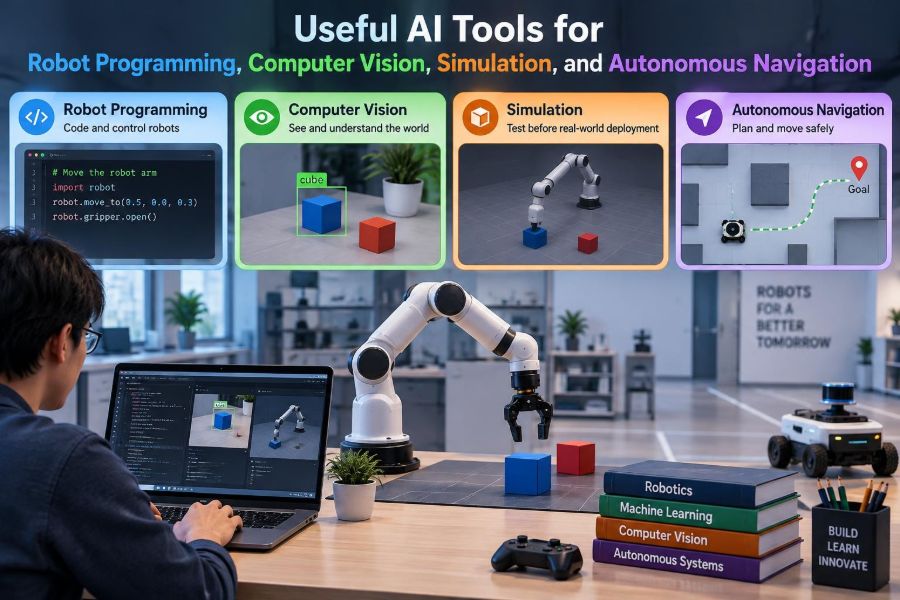
The most useful approach is to treat AI as a capable assistant inside a disciplined robotics workflow. The tools below are organized around the systems robots actually need: software, perception, simulation, navigation, and careful validation.
🧭 Start With the Robot’s Job, Not the Tool
Before selecting an AI tool, describe the robot’s operating task in observable terms. “Navigate autonomously” is too broad; “carry a tote between marked stations while yielding to people” exposes requirements for mapping, perception, motion control, recovery behavior, and safety boundaries.
Then identify where uncertainty enters the task. A warehouse robot may need better obstacle classification, while an inspection arm may need reliable pose estimation. AI is most valuable when it addresses a specific uncertainty rather than being added as a general upgrade.
🧩 Separate the Robotics Stack Into Layers
Robotic systems are easier to reason about when divided into layers: hardware interfaces, state estimation, perception, planning, control, and the application behavior that coordinates them. Each layer has different data, failure modes, and suitable tools.
A language model may help draft a ROS 2 node, while a vision model detects pallets and a simulator evaluates braking behavior. One tool will not replace all three. Clear interfaces between layers also make it easier to test AI components without risking the full robot.
💬 Use Coding Assistants as Pair Programmers
Conversational coding assistants can explain unfamiliar APIs, produce small code skeletons, generate unit-test ideas, and translate a requirement into a checklist. They are particularly useful when learning package structure, message types, coordinate transforms, or middleware concepts.
Ask narrow questions with concrete context. “Write a node that subscribes to this message and publishes this command at a bounded rate” is easier to review than “make my robot navigate.” Include software versions and expected inputs, because robotics APIs change and generated examples may be outdated.
🔍 Verify Generated Robot Code Line by Line
Generated code is not evidence that the robot will behave correctly. A plausible-looking snippet can use a deprecated interface, reverse a coordinate convention, omit error handling, or command motion before sensor data is valid.
- Compile and lint the code in the actual target environment.
- Check units, frame names, timestamps, array ordering, and sign conventions.
- Run it first with recorded data or simulation.
- Add limits for velocity, acceleration, workspace, and retries.
In robotics, code review must include physical meaning. A syntactically valid command can still be mechanically unsafe.
🧱 Generate Boilerplate, Not Unexamined Architecture
AI tools are well suited to repetitive work: configuration templates, launch files, message wrappers, parameter documentation, and test fixtures. This can leave more engineering time for system design and field testing.
Be more cautious with architecture decisions. Whether a behavior belongs in a state machine, behavior tree, planner, or controller depends on timing, failure recovery, hardware constraints, and maintainability. Those trade-offs require knowledge of the particular robot, not just a generic pattern.
🧪 Build Tests Before Asking AI to Fix a Bug
A robot bug described only as “it sometimes turns the wrong way” is difficult for any assistant to diagnose. Capture a repeatable test: input messages, parameter values, map version, expected result, and the observed output.
Once a failure is reproducible, AI can help inspect likely causes or suggest test cases around boundaries. The test remains the authority. A proposed fix should demonstrate that it resolves the reported case without breaking normal cases.
📋 Turn Logs Into Structured Debugging Clues
Robots generate logs from sensors, controllers, operating systems, and middleware. Searching them manually is slow, especially when faults appear after a sequence of events. AI-assisted log analysis can cluster recurring errors, summarize time windows, and propose correlations worth checking.
Do not mistake correlation for cause. If localization errors appear near high CPU use, investigate both the computing load and the sensor pipeline. Preserve raw logs, timestamps, and configuration snapshots so that a human can trace every summary back to evidence.
🧠 Know What a Vision Model Actually Produces
Computer vision models do not “understand” a scene as a person does. They transform images into outputs such as class labels, bounding boxes, pixel masks, keypoints, depth estimates, or object embeddings.
The output type must fit the robotic decision. A bounding box may be enough to count packages, but grasping often needs an object mask, depth, pose, or a carefully designed grasp policy. Choosing the smallest sufficient output can reduce computation and simplify validation.
📷 Choose Detection, Segmentation, or Pose Estimation Deliberately
| Task | Useful output | Typical robot use |
|---|---|---|
| Object detection | Class and rectangular location | Find a person or pallet |
| Segmentation | Pixel-level region | Separate a part from a cluttered background |
| Keypoints or pose | Landmarks or position and orientation | Align a gripper or inspect an assembly |
| Tracking | Persistent identity over time | Follow a moving target or estimate motion |
More detailed outputs are not automatically better. Segmentation and pose estimation generally demand more labeled data, computation, and evaluation effort. Start from the decision the robot must make, then select the perception task that supplies the necessary geometry.
🏷️ Treat Training Data as an Engineering Asset
Many perception failures are data failures. A model trained on clean, centered product images may struggle with motion blur, shadows, occlusion, camera vibration, uncommon orientations, or a lens that differs from the training setup.
Use annotation tools to label examples consistently, but define the labeling rules first. Decide whether a partially hidden object counts, how to label reflections, and where an object boundary belongs. Ambiguous labels teach the model ambiguous behavior.
🌦️ Collect Edge Cases Before Deployment Finds Them
Useful datasets represent the environments in which a robot must operate, including difficult but expected conditions. For an outdoor delivery robot, this may include low sun, wet pavement, leaf-covered curbs, and pedestrians with umbrellas. For a factory cell, it may include different packaging, gloves, glare, and clutter.
Edge cases should not be treated as an endless collection exercise. Rank them by plausible frequency and consequence. A rare visual artifact may matter little, while a rare condition that can cause a collision deserves a deliberate test plan.
📏 Evaluate Vision Beyond a Single Score
Aggregate metrics can hide operational weaknesses. A detector may perform well overall while missing dark objects, distant objects, or a class that appears only in a high-risk zone near the robot.
Break evaluation down by scene condition, object size, class, distance, camera, and confidence threshold. Inspect false positives as well as false negatives. A robot that repeatedly stops for harmless shadows may be safer than one that misses obstacles, but it can still fail its productivity requirement.
⚡ Budget Latency From Camera to Actuator
Perception is only useful if it arrives in time for a decision. End-to-end latency includes image exposure, transfer, preprocessing, model inference, message transport, planning, and control. Looking only at model inference time can be misleading.
For moving robots, calculate whether the robot can detect, decide, and stop within the available distance under conservative conditions. If not, reduce speed, improve sensing range, optimize the pipeline, or redesign the behavior. Faster inference is one option, not the only option.
🧰 Use Foundation Models With Clear Boundaries
Large pre-trained models can help classify open-ended objects, describe scenes, retrieve similar images, or turn natural-language instructions into candidate task plans. They can be valuable where enumerating every object class in advance is unrealistic.
However, a flexible model should not directly issue unrestricted motor commands. Place it behind constrained interfaces: approved object labels, fixed action schemas, confidence checks, workspace limits, and human confirmation where the task warrants it. Open-ended interpretation and deterministic actuation need a careful boundary.
🗺️ Understand the Difference Between Mapping and Localization
A map represents the environment; localization estimates where the robot is within that map. Simultaneous localization and mapping, often called SLAM, attempts both when a reliable map does not yet exist.
AI may contribute to visual features or scene understanding, but localization still depends on sensor calibration, motion estimates, timestamp alignment, and environmental stability. A semantically rich map is helpful only if its geometric frame remains accurate enough for motion planning.
📡 Fuse Sensors Instead of Trusting One Perfectly
Cameras provide visual context but can struggle in poor lighting. LiDAR gives geometric range measurements but may have difficulty with some surfaces. Wheel encoders drift, and inertial measurement units accumulate error. Sensor fusion combines complementary evidence to estimate robot state more robustly.
Fusion is not magic. Poor calibration or time synchronization can make combined sensors worse than either sensor alone. Establish coordinate transforms and timestamp behavior with simple measurements before adding complex estimation algorithms.
🧭 Match Navigation Methods to the Environment
Autonomous navigation usually combines a global route with local obstacle avoidance. The global planner finds a broad path through a map; the local controller chooses immediate safe motion while responding to sensor updates.
Structured indoor spaces often benefit from mapped navigation and predictable traffic rules. Less structured settings may require stronger local perception and conservative behavior. Learning-based navigation can be useful for difficult perception-action relationships, but it needs extensive scenario testing because its decision process may be harder to interpret.
🚶 Model People as Dynamic, Not Static Obstacles
A chair can be represented as an occupied region on a map. A person changes speed and direction, may be briefly occluded, and expects the robot to behave legibly. Navigation around people should consider prediction uncertainty, personal space, stopping behavior, and local operating policies.
A practical system can slow down when tracks become uncertain, avoid passing closely in narrow spaces, and choose a safe stop when a route is blocked. Smooth, understandable motion is often preferable to a path that is technically short but surprising.
🛑 Keep Safety Functions Independent Where Needed
AI perception can inform robot behavior, but safety-critical protection should not depend solely on a probabilistic model. Sensors, emergency stops, protective zones, speed limits, and hardware or certified safety functions may be required depending on the machine and application.
The exact safeguards depend on risk assessment, operating environment, and applicable rules. Engineers should involve qualified safety professionals rather than assuming that a confidence score is a safety guarantee. Low confidence is not the same thing as safe behavior.
🎮 Simulate the System Before You Reserve the Lab
Simulation lets teams test logic repeatedly without battery charging, hardware wear, or risk to people and equipment. It is useful for checking coordinate frames, mission logic, controller tuning, navigation recovery, and basic sensor placement.
Use a simulator to answer focused questions: Can the robot reach every station? What happens when its path is blocked? Does the arm collide with a fixture at a given joint limit? A simulation is most valuable when its assumptions are explicit.
🌍 Build a Digital Twin With the Right Fidelity
A digital twin is a digital representation connected to some aspect of a physical system. For robotics, it may range from a simplified scene used for planning to a model updated with real robot state and facility information.
Do not model every bolt if the question is about route selection. Conversely, a contact-rich manipulation task may require more accurate geometry, friction assumptions, and joint dynamics. Fidelity should be chosen according to the decision being tested, not visual realism alone.
🎲 Use Domain Randomization to Challenge Perception
Domain randomization varies simulated textures, lighting, object positions, camera noise, and other features so that a model does not become dependent on one artificial scene. It can improve the diversity of training and testing conditions when real data is limited.
Randomization should remain plausible enough to exercise meaningful behavior. Unrealistic combinations may consume training capacity without representing an operational risk. Validate any simulated-data benefit on a separate set of real images from the intended environment.
🔁 Expect a Sim-to-Real Gap
Every simulator omits something: sensor artifacts, flexible cables, wheel wear, floor variation, network delay, human behavior, or a slight camera shift after maintenance. The difference between simulated and physical behavior is called the sim-to-real gap.
Reduce it gradually with calibration, measured parameters, real-world replay data, and staged trials. Start with low speed and limited workspace, then expand conditions as evidence grows. Simulation accelerates learning; it does not eliminate the need for real validation.
📦 Manage Models Like Production Software
A trained model is a versioned dependency, not a mysterious file copied into a deployment folder. Record its training data version, label policy, preprocessing steps, architecture, parameters, evaluation slices, and intended operating conditions.
Also version the inference runtime and hardware target. A model can change behavior after quantization, conversion, camera firmware changes, or a different image preprocessing path. Reproducibility is what lets a team explain why a robot changed after an update.
📉 Monitor Drift After the Robot Goes Live
Data drift occurs when operational inputs differ from the data used to build or validate a model. A new box design, seasonal lighting, a moved camera, or accumulating dirt on a lens can alter perception quality without changing the software.
Monitor practical signals: confidence distributions, manual interventions, emergency stops, failed grasps, localization resets, and samples for periodic review. Monitoring should lead to a response plan, such as cleaning a sensor, adjusting thresholds, collecting labels, retraining, or rolling back a release.
🔐 Protect the Robot’s AI Data Path
Cameras, maps, telemetry, models, and remote update channels are part of the robotic system’s attack surface. A compromised configuration, poisoned dataset, or unauthorized model update can affect physical behavior as well as information security.
Apply ordinary engineering discipline: access control, authenticated updates, dependency review, backups, audit logs, and separated development and deployment credentials. Limit cloud access according to operational need, especially where image data may capture people or sensitive facilities.
👥 Design Human Review Into the Workflow
Human oversight is not only for emergencies. Operators and technicians often notice environmental changes, awkward routes, sensor contamination, and failure patterns before dashboards do. Give them a clear way to report examples and understand what the robot is trying to do.
For tasks with significant consequences, use approval gates. An AI system might suggest an inspection anomaly, but a qualified person decides whether it is a defect. This division preserves the speed of automated screening while retaining accountable judgment.
🧱 Avoid the “End-to-End Solves Everything” Trap
An end-to-end learned policy maps observations directly to actions. It can be powerful in narrowly defined tasks, but it may be difficult to diagnose when behavior changes. Traditional components such as kinematics, occupancy checks, and bounded controllers remain useful because their constraints are inspectable.
Hybrid systems often offer a practical compromise. Use learning where perception is ambiguous or hand-coded rules become brittle, then pass results into planners and controllers with explicit limits. The best division of labor depends on the task and the evidence available.
🧰 A Practical Tool Selection Checklist
When comparing an AI assistant, vision framework, simulation platform, or navigation component, evaluate the engineering fit rather than feature lists alone.
- Does it work with your operating system, middleware, sensors, and compute hardware?
- Can you inspect inputs, outputs, failures, and version history?
- Does it meet the needed latency, memory, and reliability constraints?
- Can the team maintain it when the original developer is unavailable?
- What happens when it is uncertain, unavailable, or wrong?
A small, observable tool that fits the workflow is often more useful than a sophisticated system that cannot be tested or supported.
🗓️ Build Skills Through Small, Complete Projects
Students and professionals learn fastest by finishing narrow projects that cross a full robotics loop. For example, record images of three object types, label them, train a detector, measure failures under changed lighting, and use the result only to trigger a simulated robot response.
Then expand one variable at a time: add depth, introduce tracking, move to a real camera, or connect the output to a constrained planner. Each step creates evidence about where the system is reliable and where more engineering is required.
🤝 Treat AI as a Tool for Better Engineering Judgment
The useful question is not whether AI can write code, recognize objects, or plan a route. It is whether it helps the team make a robotic system more observable, testable, maintainable, and safe for its actual operating conditions.
Use AI to accelerate drafts, discover patterns, generate candidate solutions, and broaden test scenarios. Use measurements, constraints, simulation, real-world trials, and human review to decide what the robot is allowed to do. That combination turns impressive outputs into dependable engineering practice.
The strongest robotics workflow uses AI to reduce repetitive effort while keeping validation, safety boundaries, and accountable human judgment at the center. Build the loop, measure the result, and improve it one verified decision at a time. 🦾🧭🤖