
A strip of black tape on a pale floor looks simple—until a small robot reaches its first sharp corner, hesitates, overshoots, and begins hunting from side to side. That behavior is familiar to anyone who has assembled a line-following robot from a kit or breadboard.
The project is often treated as a beginner exercise, but it contains many of the same engineering problems found in autonomous machines: sensing an imperfect environment, turning measurements into decisions, controlling motors, managing power, and testing systematically.
A robot that merely stays near a line is a good first result. A robot that takes curves smoothly, recovers from disturbances, and behaves consistently as its battery discharges is a much more instructive one.
This build focuses on that difference. You will create a practical two-wheel line follower, then use its behavior to learn why sensor placement, mechanics, software timing, and control tuning all matter.
🎯 Define What “Good Following” Means
Before selecting parts, define the task. A basic robot should track a high-contrast tape line on a flat indoor surface at a modest speed. That scope is realistic and makes faults easier to diagnose.
“Smooth” does not mean the robot never moves sideways. It means corrections are controlled rather than abrupt: the robot enters a turn without oscillating, does not repeatedly cross the line, and returns predictably after a small push.
Write down the expected track features, including line width, minimum curve radius, intersections, and lighting conditions. A design that handles a gentle oval may fail on a narrow S-curve for completely valid physical reasons.
🧠 Understand the Robot’s Feedback Loop
A line follower is a closed-loop control system. Sensors estimate where the line is, software calculates an error, and motors steer the chassis to reduce that error. The next sensor reading reveals whether that correction helped.
The loop repeats many times per second. If it is too slow, the robot travels a noticeable distance before responding. If its response is too aggressive, it can turn past the line and demand an equally aggressive correction in the other direction.
Think of balancing a broom on your hand. You need timely observations, modest corrective movements, and a response that reflects how far the broom has moved—not a full-strength lunge at every tiny change.
🧰 Choose a Sensible Core Parts List
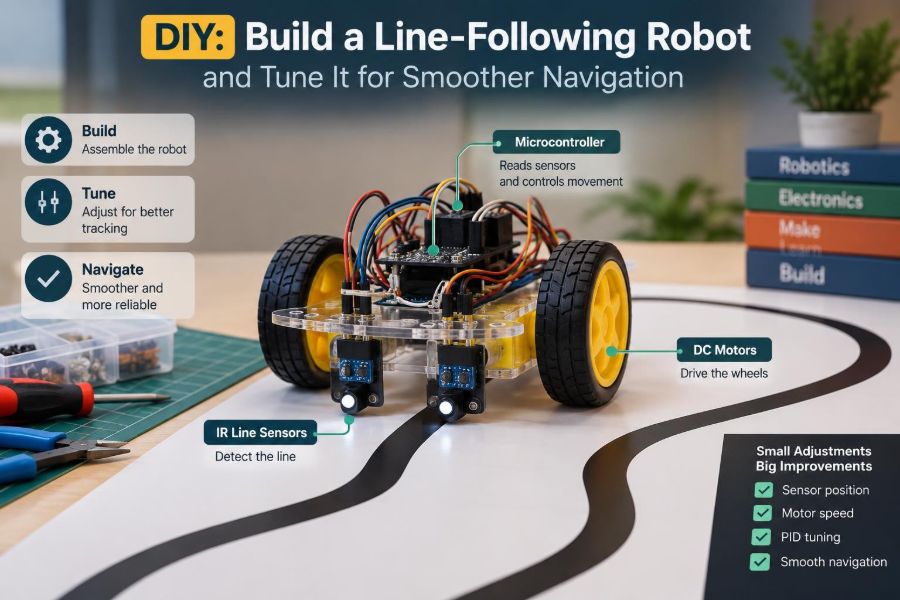
A reliable introductory design uses a differential-drive chassis: two independently driven wheels and one low-friction caster or skid. Steering comes from changing the relative speed of the left and right wheels.
- Microcontroller board, such as an Arduino-compatible board or other controller with analog or digital inputs
- Two geared DC motors, matched wheels, and a chassis
- Dual H-bridge motor driver sized for the motors’ expected current
- Three to eight reflective infrared sensors, either separate modules or a sensor array
- Battery pack, power switch, wiring, and appropriate voltage regulation
- Black electrical tape or matte printed line, plus a light-colored track surface
Do not choose a motor driver only by its convenient pin layout. Check its voltage range, continuous current capability, heat dissipation requirements, and voltage drop. A driver that runs hot or starves the motors of voltage makes tuning misleading.
⚙️ Select Gearing for Control, Not Bragging Rights
Fast motors make a robot look lively, but they reduce the time available to sense and correct. For a first line follower, moderate gearing is easier to control than a chassis that can outrun its own sensor loop.
Torque also matters. A geared motor with enough torque starts consistently and handles minor floor friction changes without stalling. A motor near stall current can overload the battery or driver, causing resets that resemble software bugs.
Begin with a conservative maximum speed. Increase it only after the robot can follow the full track repeatedly. High-speed tracking is a separate engineering target, not the default test condition.
🛞 Build a Chassis That Does Not Fight the Code
Mount the drive wheels square to the chassis and ensure both touch the ground with similar load. A wheel that is slightly misaligned creates a persistent turning bias, forcing the controller to compensate for a mechanical defect.
Place heavy components low and near the center. Keep the battery secure; a battery that shifts during a turn changes traction and can pull wires loose. The caster should roll or slide freely without lifting one drive wheel.
Spin each wheel by hand and inspect the chassis from above. If it veers mechanically when pushed in a straight line, correct that first. Software trim is useful, but it should not become a substitute for basic alignment.
📍 Position the Sensor Array Strategically
Mount the sensors at the front of the robot, ahead of the drive axle. This distance creates look-ahead: the sensors detect a curve before the wheels reach it, giving the controller time to steer.
Too little look-ahead makes the robot react late. Too much can cause a different problem: the sensor sees a line position that no longer corresponds closely to where the wheels are, especially in tight turns.
For reflective sensors, maintain a consistent height above the track according to the sensor’s useful range. Even a modest change in height affects reflected light. Use rigid mounting rather than tape or flexible cardboard for the final build.
🔦 Know What Reflective Sensors Actually Measure
Most line sensors shine infrared light toward the floor and measure how much returns. A light surface usually reflects more than matte black tape, but the output depends on distance, angle, surface texture, ambient light, and sensor hardware.
That means a sensor does not directly “see black.” It sees a signal level. A glossy dark tape can sometimes reflect differently from expected, while a dirty white board may look darker than a clean one.
Shielding the array from direct room light can improve consistency. A simple low side wall or cover is often more useful than endlessly adjusting threshold values under changing sunlight.
📏 Pick the Right Number and Spacing of Sensors
Two sensors can make a line follower turn left or right, but they provide limited information. Three sensors add a center reference. Five or more sensors can estimate line position more smoothly and offer better recovery when the robot drifts.
| Array type | Best use | Main limitation |
|---|---|---|
| Two sensors | Simple on/off steering demonstrations | Coarse corrections and weak recovery |
| Three sensors | Basic proportional behavior | Limited resolution on wide or complex lines |
| Five to eight sensors | Smoother position estimate and wider coverage | More calibration and processing |
Spacing should ensure that at least one sensor encounters the line through normal movement. Large gaps can allow a narrow line to pass between sensors, while extremely tight spacing adds cost with little practical improvement.
🔌 Separate Motor Noise from Logic Power
DC motors are electrically noisy loads. Their brushes and rapidly changing current can create voltage dips and interference that cause false sensor readings or reset a microcontroller.
Use a battery and regulation arrangement that can supply motor current without pulling the logic rail below its operating range. Keep motor wiring physically separated from sensor wires where practical, and make all required grounds common.
Place suitable decoupling capacitors near electronics as recommended by component documentation. If resets happen exactly when motors start or reverse, investigate power integrity before rewriting the control algorithm.
🧯 Wire for Inspection and Safety
Install a reachable power switch and disconnect power before changing wiring. A compact robot has little room for accidental shorts, and loose conductors near wheels can quickly become damaged.
Use color conventions consistently: for example, red for positive supply, black for ground, and separate colors for signal wiring. Label connectors or keep a simple pin map beside the project.
Before applying full power, inspect polarity, driver connections, and exposed metal. Test motors with the wheels raised so an unexpected command does not send the robot across the bench.
🧪 Validate Each Subsystem Before Integration
Trying to debug sensors, motors, power, and control logic simultaneously is frustrating because each fault masks the others. Bring up one subsystem at a time.
- Print raw values from each sensor while moving tape under the array.
- Command each motor forward and reverse at several duty cycles.
- Confirm that a positive steering command produces the intended physical turn.
- Run the combined system slowly with wheels raised.
- Place the robot on the track only after these checks are clear.
This order converts a vague “it does not work” problem into smaller questions with observable answers.
📊 Calibrate the Sensors on the Real Track
Calibration records the expected range of each sensor over the actual line and background. Move the robot slowly so every sensor sees both surfaces, then store its observed minimum and maximum values.
Normalize readings to a common range after calibration. This reduces differences caused by one sensor sitting slightly higher or having a different emitter strength. A normalized value is often more useful than a raw analog number.
Repeat calibration whenever you change sensor height, surface material, lighting, or sensor board. Values collected over one floor are not automatically valid for another.
🧭 Convert Sensor Data into a Line Position
With several sensors, assign each sensor a position such as -2, -1, 0, 1, and 2. Multiply each normalized line-detection value by its position, sum the results, and divide by the total detection strength.
position = sum(sensorValue[i] * sensorPosition[i]) / sum(sensorValue[i])
error = targetPosition - position
The result is a weighted estimate of where the line lies under the array. The center target is typically zero. A negative or positive error indicates direction, while its magnitude indicates how far off-center the line appears.
Handle the case where the denominator is near zero. That means the line is missing or poorly detected, and dividing would create meaningless results.
↔️ Turn Error into Differential Steering
A common drive rule starts with a base speed. The controller adds a correction to one wheel and subtracts it from the other.
leftCommand  = baseSpeed + correction
rightCommand = baseSpeed - correction
Check motor orientation carefully. If a positive correction drives the robot farther away from the line, swap the correction sign in software or correct motor direction wiring. This simple sign mistake is extremely common.
Clamp commands to the range your driver accepts. Without limits, a large correction can demand values beyond the available motor voltage, making the mathematical model unlike the real machine.
📐 Start with Proportional Control
Proportional control, often written as P control, makes correction proportional to current error. If the line is a little left, turn a little left; if it is far left, turn more strongly.
correction = Kp * errorKp is the proportional gain. A low gain produces gentle steering but may allow wide drift. A high gain reacts sharply and can make the robot zigzag. It is the best first controller because its behavior is easy to observe.
Set integral and derivative terms to zero at this stage. Establish a reasonable P-only result before introducing additional terms.
📈 Add Derivative Damping When It Oscillates
The derivative term responds to how quickly error is changing. It can reduce overshoot by noticing when the robot is rapidly moving toward or past the line.
derivative = (error - previousError) / elapsedTime
correction = Kp * error + Kd * derivative
In physical terms, derivative action acts like damping. It is particularly useful when a P-only robot repeatedly crosses the line on straight sections or exits curves with a violent correction.
Derivative calculations amplify noisy measurements. Smooth sensor data lightly, use a stable loop period, and avoid making Kd large simply to hide a poorly calibrated array.
➕ Use Integral Action Only for Persistent Bias
The integral term accumulates error over time. It can address a small, lasting offset caused by unequal motors, uneven traction, or a slightly asymmetric chassis.
integral = integral + error * elapsedTime
correction = Kp * error + Ki * integral + Kd * derivative
Integral action is not mandatory for many hobby line followers. It can also create integral windup, where accumulated error continues pushing the robot even after conditions change.
If you use Ki, keep it small and limit the integral value. Reset or reduce it when the line is lost, when motors are stopped, or when the controller output has reached its maximum.
⏱️ Keep the Control Loop Timing Consistent
PID-style control depends on elapsed time. A loop that sometimes runs quickly and sometimes pauses for printing, delays, or blocking sensor calls will produce inconsistent derivative and integral behavior.
Use a timer-based loop or measure elapsed time on each pass. Keep the loop short: read sensors, calculate position and correction, update motors, record only the data you need.
Serial printing is useful during diagnosis, but printing every loop can slow the controller enough to change its driving behavior. Log at intervals or disable verbose output during final motion testing.
🏎️ Reduce Speed Before Raising Gain
When a robot misses turns, the instinct is often to increase Kp. Sometimes the underlying problem is simply that the chassis is traveling too fast for the track geometry and look-ahead distance.
At lower speed, the same controller receives more opportunities to correct before reaching a curve. It also reveals whether the problem is poor tuning or a mechanical issue that was hidden by momentum.
A useful strategy is speed scheduling: use a higher base speed when error is small and reduce base speed as absolute error grows. This lets the robot cruise straights while entering turns with more control authority.
🌀 Tune on Straight Lines Before Complex Curves
Start on a long straight section. Raise Kp gradually until the robot begins to oscillate noticeably, then reduce it to regain stable tracking. This establishes a useful working region rather than a magical final value.
Next, test gentle curves and add a small amount of derivative damping if the robot overshoots. Finally, test the tightest corners you expect the course to contain, reducing speed if necessary.
Change one parameter at a time and write down the result. A tuning log with base speed, Kp, Ki, Kd, battery condition, and observed behavior is much more reliable than changing several values from memory.
🧭 Design a Deliberate Lost-Line Routine
Eventually the array will see no line: at a sharp turn, a gap, a glare spot, or after a bump. Stopping immediately is safe, but it is not always the best recovery behavior.
Store the last known error direction. When the line disappears, briefly steer and search toward that side at a reduced speed. If the line is not reacquired after a defined time or distance estimate, stop rather than wandering indefinitely.
Recovery is a state change, not normal PID operation. Reset the integral term and avoid treating the absence of a line as an ordinary huge error.
🚦 Decide How to Handle Intersections and Markers
A wide black patch, T-junction, or crossing can activate several sensors at once. The weighted position method may return a center value even though the robot is approaching a decision point.
Define route rules in advance. For example, a robot may always turn left when many sensors detect dark surface, continue straight through a cross, or stop at a designated wide marker.
Use a simple state machine: detect the feature, slow down, perform the selected maneuver, then require a normal line pattern before returning to follow mode. This prevents one intersection from being detected repeatedly.
🔍 Diagnose Zigzagging, Drifting, and Late Turns
Behavior is data. A robot that zigzags on a straight line often has excessive Kp, too much sensor noise, or a slow loop. A robot that curves smoothly in one direction but not the other may have motor mismatch or asymmetric weight distribution.
| Observed behavior | Likely causes | First checks |
|---|---|---|
| Rapid left-right oscillation | High Kp, noisy readings, delayed loop | Lower Kp, inspect values, reduce logging |
| Wide slow wandering | Low Kp, low traction, poor calibration | Increase Kp gradually, inspect wheels |
| Misses sharp corners | Excess speed, short look-ahead, narrow array | Slow down, inspect placement and coverage |
| Always pulls to one side | Motor mismatch, wheel alignment, sensor offset | Mechanical check before software trim |
Observe from directly above when possible. Side-view video is useful for identifying wheel slip, caster chatter, or chassis rocking that is not obvious in sensor data.
🔋 Account for Battery and Traction Changes
Battery voltage falls during use, changing available motor speed and sometimes sensor behavior. A robot tuned only with a freshly charged battery may become sluggish later in a session.
Wheel surfaces collect dust, and different floors offer different friction. These changes alter how quickly the robot responds to a steering command. Re-test on the actual competition or demonstration surface whenever feasible.
For more demanding builds, measure battery voltage and reduce maximum speed or warn the operator below an appropriate threshold. The exact threshold depends on the battery chemistry and the rest of the electrical design.
🧱 Improve the Track Before Blaming the Robot
A useful test track has consistent line width, strong contrast, securely attached tape, and curves that match the robot’s physical capability. Wrinkles, shiny seams, and sudden width changes are legitimate disturbances, not neutral details.
Create repeatable test features: a straight, a broad curve, a tight curve, an S-bend, and an intersection. Repeat each test several times from the same starting position to separate random variation from a consistent defect.
Then deliberately introduce challenges such as a small gap or a lighting change. This approach tests robustness without confusing a basic tuning session.
🧾 Organize Code Around Modes and Parameters
Keep tunable values near the top of the program: sensor polarity, calibration data, base speed, maximum correction, and control gains. Avoid scattering unexplained numbers throughout motor and sensor functions.
Separate code into readable responsibilities: acquire sensors, normalize values, calculate line position, run the controller, command motors, and manage modes such as follow, recover, and intersection handling.
Clear structure helps working engineers as much as students. When a change causes worse behavior, you can identify whether the issue lies in measurement, decision-making, or actuation.
🧑🔧 Treat Tuning as an Engineering Experiment
Good tuning is not a guessing contest. Form a small hypothesis—such as “the corner miss is caused by excess entry speed”—then change only the variable that tests it and observe the result.
Record enough context to reproduce outcomes: track, lighting, sensor height, battery state, firmware version, and parameter values. A short notebook or spreadsheet prevents the common mistake of rediscovering the same failed setting.
When an adjustment helps one section but harms another, do not assume it is wrong. It may indicate a trade-off that calls for speed scheduling, better mechanics, or a different sensor layout rather than one global gain.
🚀 Extend the Project After It Is Stable
Once the basic robot follows reliably, add features with a clear purpose. An encoder on each wheel can reveal speed mismatch. An indicator LED can show calibration or lost-line mode. A display or serial plot can expose sensor patterns.
You can also experiment with a wider sensor array, adaptive speed, route markers, or a separate high-level state machine. More advanced approaches may model curvature or use camera vision, but they still depend on the same foundations: trustworthy sensing, controllable mechanics, and disciplined testing.
Resist adding features while the base behavior is unstable. Every new subsystem expands the number of possible causes when the robot acts unexpectedly.
✅ Bring the Build Together
A smooth line-following robot comes from the interaction of parts, not from a single clever formula. A clean sensor signal is wasted on a twisted chassis; a well-tuned controller cannot overcome inadequate power; fast motors do not help if the robot cannot see a turn in time.
Build in stages, verify measurements before interpreting them, tune at a controlled speed, and test one change at a time. These habits transfer directly to larger mobile robots, industrial automation, and embedded control work.
The core principle is simple: make the robot observe clearly, react proportionally, and operate within the physical limits of its sensors, motors, track, and power system.
A line follower may start as a weekend build, but careful calibration and patient tuning turn it into a compact lesson in real robotics engineering. 🦾🛞📍