
A technician needs to inspect a leaking pipe inside a hazardous industrial area. A surgeon must guide an instrument with movements too small for an unassisted human hand. A researcher wants to collect a rock sample from a place no person can safely reach.
In each case, the human decision-maker may be far from the physical work. Yet they can still see the scene, move a machine, feel some of the contact forces, and respond when conditions change. This is the practical promise of robotic teleoperation.
Teleoperation is not simply “driving a robot remotely.” It is a carefully designed conversation between a person, a control interface, communication networks, sensors, and a robot operating in the real world.
That conversation becomes difficult when video is delayed, cameras hide a critical angle, contact forces are hard to judge, or a robot has more joints than the operator can comfortably control. Understanding those constraints is essential for anyone designing, operating, or evaluating remote robotic systems.
🤖 What Robotic Teleoperation Means
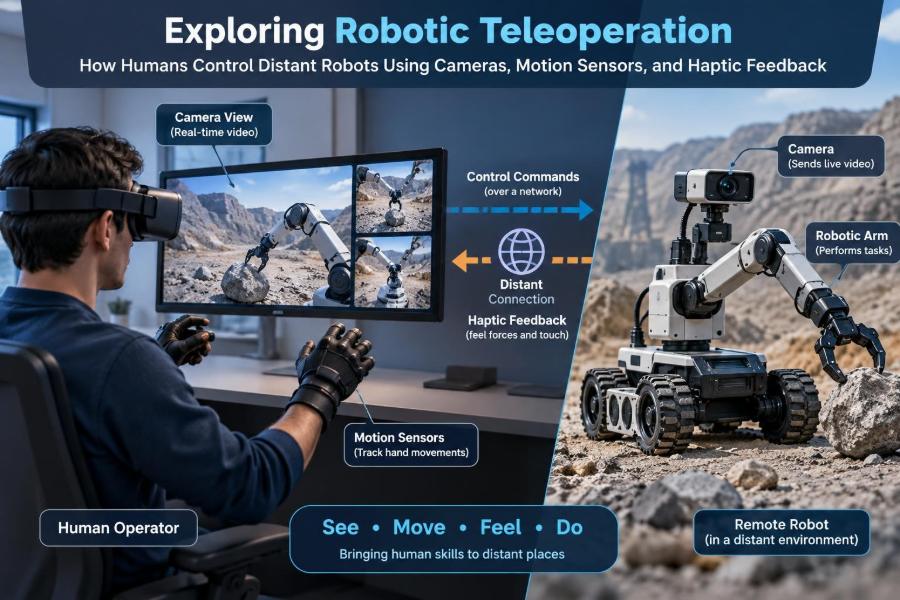
Teleoperation is the direct or shared control of a robot by a human operator located away from the robot. The operator sends commands; the robot sends information back through cameras, force sensors, position sensors, microphones, and other feedback channels.
A remote-controlled toy car is a simple form of teleoperation. Advanced systems add robotic arms, autonomous safeguards, three-dimensional mapping, motion tracking, and force feedback. The human remains involved because the task requires judgment, dexterity, interpretation, or accountability that full autonomy cannot reliably provide.
🧭 Why Keep a Human in the Control Loop?
Robots excel at repeatable motion, heavy lifting, precise positioning, and working in environments that are uncomfortable or dangerous for people. Humans remain better at interpreting ambiguous scenes, recognizing unusual conditions, and deciding what outcome is appropriate when instructions do not cover every possibility.
A remotely operated underwater vehicle, for example, may stabilize its position automatically while a pilot chooses where to inspect and how to approach delicate equipment. This combination is often called shared autonomy: automation manages predictable low-level work while the person directs goals and intervenes when needed.
📡 The Basic Teleoperation Loop
Every teleoperation system forms a closed loop. The operator observes the robot and environment, decides on an action, sends a command, and receives updated feedback showing the result. If any part of this loop is weak, performance falls.
- Human interface: controllers, pedals, motion trackers, displays, and emergency controls.
- Communication link: wired, wireless, cellular, satellite, or local network connections.
- Robot side: actuators, onboard controllers, safety logic, and tools.
- Feedback: video, audio, robot state, force information, and environmental data.
Good teleoperation design treats these as one system rather than as unrelated components.
🎥 Cameras as the Operator’s Eyes
Video is usually the primary feedback channel because it gives the operator direct evidence of location, object shape, motion, and hazards. A camera on the robot’s wrist can show a gripper approaching a bolt, while a fixed overview camera reveals whether the arm is about to collide with nearby equipment.
One camera view is rarely enough. Perspective can make a gap appear larger or smaller than it is, and a view aligned with the tool may conceal sideways errors. Operators often need a deliberate mix of wide context, close manipulation views, and occasionally views from the robot’s rear or side.
👁️ Depth Perception and Stereo Vision
Depth judgment is especially difficult when placing tools, grasping objects, or operating near people. Stereo cameras use two slightly separated lenses to provide different images to each eye, creating a sense of depth similar to human binocular vision.
Stereo vision can help, but it is not a universal fix. Camera calibration, display quality, field of view, lighting, and operator comfort all affect its usefulness. A well-placed monocular camera with clear visual markers may be more effective than poor stereo imagery for some inspection tasks.
🔄 Camera Motion Can Help or Confuse
A movable pan-tilt-zoom camera lets an operator inspect details without moving the whole robot. A wrist-mounted camera follows the tool and can make fine manipulation easier. However, constantly changing viewpoints can disorient an operator who is already managing a complex task.
Systems should make camera control predictable. Useful practices include a stable default view, quick return-to-home framing, named camera presets, and clear indication of which camera is live. When video control competes with driving or manipulation controls, the operator’s workload rises sharply.
🎮 Control Interfaces Turn Intent into Motion
The control interface translates human intent into robot movement. It may include joysticks, game-style controllers, steering wheels, pedals, touchscreens, keyboards, exoskeleton devices, or specialized surgical handles.
The best interface depends on the task. A joystick can efficiently control a mobile robot’s speed and turn rate, while a six-degree-of-freedom hand controller is better suited to positioning a robotic arm in three-dimensional space. Familiar hardware is helpful, but task compatibility matters more than familiarity alone.
🖐️ Motion Capture and Master Devices
In a master-slave arrangement, the operator moves a master device and the remote robot, or slave robot, follows that motion. A tracked hand controller might command the position and orientation of a robot wrist; a wearable exoskeleton can capture larger arm movements.
Direct motion mapping feels intuitive when the robot and person have similar ranges of motion. It becomes harder when they do not. A human arm can move freely around obstacles, while a robot arm may encounter joint limits, singularities, or a fixed base that makes the same motion impossible.
📐 Degrees of Freedom Explain Robot Dexterity
A degree of freedom is an independent way a mechanism can move. A mobile robot may translate forward and rotate. A robotic arm may have several rotary joints, while its wrist adds orientation control and the gripper adds opening and closing.
More degrees of freedom can make a robot dexterous, but they also create more possible configurations. The operator should not have to think about every joint individually. A capable controller can convert a simple command such as “move the tool tip left” into coordinated joint motion.
🧮 Mapping Human Motion to Robot Motion
Motion mapping defines how input movement becomes robot movement. In position control, the robot attempts to match a target pose set by the operator. In velocity control, the controller deflection determines how fast the robot moves in a direction.
Position control can feel natural for delicate tasks, but it needs careful handling when the robot reaches its workspace limit. Velocity control can cover large spaces without repeated clutching, yet it may be less precise for a beginner. Many systems provide both modes for different phases of a task.
⚙️ Scaling Makes Fine Work Possible
Motion scaling deliberately changes the relationship between human motion and robot motion. With a five-to-one scale, a five-centimeter hand movement may create only one centimeter of robot movement. This allows controlled work in confined or delicate spaces.
Scaling has a trade-off: very slow robot motion can make broad repositioning tedious. A practical interface offers selectable scales, allowing fast travel to the work area and slow motion near an object, edge, or contact surface.
🤏 Clutching Prevents Awkward Operator Postures
When an operator’s hand reaches the edge of a comfortable physical workspace, a clutch lets them release the mapping temporarily. They can reposition their hand or master device without causing the robot to move, then resume control.
This small feature has large ergonomic value. Without it, operators may twist shoulders, overextend wrists, or make rushed movements simply to maintain control. For prolonged sessions, good posture is a safety and performance requirement, not a cosmetic preference.
✋ What Haptic Feedback Adds
Haptic feedback communicates information through touch and force. A controller may resist movement when the robot encounters a surface, vibrate when a force threshold is reached, or guide the operator away from a virtual boundary.
Visual feedback can show that a gripper has touched an object, but haptics can help the operator sense how contact is developing. This is valuable when handling fragile items, inserting connectors, polishing surfaces, or interacting with compliant materials that deform before they visibly shift.
💪 Force Reflection and Its Limits
Force reflection sends measured or estimated robot-side forces back to the operator’s master device. Ideally, the operator feels resistance that corresponds to contact at the remote tool. This can improve awareness, but a perfect recreation of force is rarely possible.
Sensor noise, communication delay, actuator limits, and differences in scale complicate the design. Strong, sudden feedback can also be uncomfortable or destabilizing. Designers may filter, cap, or simplify forces so feedback remains informative without turning into a distracting or unsafe physical sensation.
📳 Vibrotactile Cues Are Often Simpler
Not every task requires a force-feedback arm. Vibrotactile feedback uses vibration patterns to signal events such as contact, increasing grip force, proximity to an obstacle, or loss of network quality.
These cues do not tell the operator the exact shape of a contact force, but they can reduce visual overload. For example, a brief pulse can confirm that a gripper has closed around an object, allowing the operator to keep attention on the surrounding scene rather than a status panel.
⏱️ Latency Changes How the Robot Feels
Latency is the time between an action or event and its visible, audible, or physical response. In teleoperation, it includes sensing, encoding, transmission, processing, command execution, and display delays.
Small delays may be manageable during slow inspection. Delays become much more disruptive during rapid driving, close-contact manipulation, or tasks requiring continuous corrections. The operator may react to an old image, overcorrect, and then react again to the result, creating oscillation or unstable motion.
🌐 Jitter and Packet Loss Matter Too
Average delay is not the whole story. Jitter is variation in delay, while packet loss occurs when some transmitted data never arrives. An operator can sometimes adapt to a steady delay, but unpredictable timing is harder because the system no longer responds consistently.
Teleoperation networks need sensible priorities. Emergency commands, robot state, and control traffic should not be crowded out by less critical data. Video may tolerate occasional quality reduction better than the control loop tolerates erratic commands.
🧠 Predictive Displays Bridge Communication Delays
When delay cannot be eliminated, a predictive display can show an estimate of where the robot will be after recently sent commands are executed. The display may overlay planned tool motion or present a local simulation alongside delayed camera imagery.
Prediction helps only when its uncertainty is clear. If a virtual model suggests a robot has moved safely but the physical robot is obstructed, the operator must not mistake the estimate for reality. Good interfaces distinguish measured state from predicted state through labels, colors, or display regions.
🛑 Safety Requires Layers, Not One Stop Button
An emergency stop is necessary, but it is only one layer of protection. Safe teleoperation also relies on speed limits, workspace boundaries, collision detection, watchdog timers, mechanical brakes, fault monitoring, and procedures for failed communication.
Safety logic should be designed around realistic failures. If video freezes, should the robot stop, hold position, retreat, or continue a stable automated action? The answer depends on the tool, environment, stored energy, and potential harm. There is no single correct behavior for every system.
🧱 Virtual Fixtures Guide Safe Motion
A virtual fixture is a software-defined constraint or guide that shapes robot movement. It might prevent a surgical tool from entering a prohibited region, keep an inspection probe at a preferred distance from a surface, or guide a gripper along an insertion path.
Virtual fixtures can reduce accidental motion while preserving human authority. They must be validated carefully because incorrect environmental models or poorly chosen boundaries can block legitimate actions or create false confidence in a changing workspace.
🧩 Shared Autonomy Reduces Control Burden
Shared autonomy divides work between human and machine. The operator might point to an object, and the robot computes a collision-aware approach. The robot may hold a camera steady, regulate tool force, maintain altitude, or stabilize a mobile platform while the human focuses on the meaningful decision.
The key is transparency. Operators need to know what automation is doing, what it is allowed to change, and how to override it. Automation that acts mysteriously can be harder to supervise than manual control, especially when the environment differs from the robot’s assumptions.
🚧 Remote Driving Needs Different Skills Than Arm Control
Driving a ground robot requires awareness of vehicle footprint, traction, slopes, stopping distance, and camera perspective. Manipulating with an arm requires precise depth judgment, contact awareness, and an understanding of joint motion. A single operator may do both, but switching tasks increases mental workload.
Consider a hypothetical disaster-response robot entering a damaged building. It may navigate through debris using a wide front camera, then stop and use an arm to turn a valve. Separating driving and manipulation modes, or assigning roles to two trained operators, can make the workflow clearer.
🌊 Underwater Teleoperation Shows the Delay Problem
Underwater robots often work where direct human access is difficult, including inspection of submerged structures and scientific observation. Tethered systems can provide substantial bandwidth and power, but water conditions may reduce visibility and moving currents can push the vehicle and tools.
For systems operating through long communication paths, delay makes fast manual correction impractical. Local autonomy for station keeping, depth regulation, and attitude control can therefore be more useful than attempting to pilot every small motion from afar.
🏥 Surgical Teleoperation Demands Deliberate Design
Robot-assisted surgical systems demonstrate why precision alone is not enough. The interface must support fine motion, stable visualization, ergonomic posture, clear instrument state, and reliable safety behavior. Motion scaling and tremor filtering may help translate a surgeon’s intent into controlled instrument movement.
Such systems are used within specialized clinical processes and training requirements. They do not remove the need for professional judgment, patient-specific planning, or awareness of equipment limitations. Teleoperation can enhance a clinician’s capabilities, but it does not make a complex procedure automatically safe.
☢️ Hazardous Environments Benefit from Distance
Teleoperated robots can reduce direct exposure during work around radiation, toxic substances, extreme heat, unstable structures, or explosive hazards. Distance is valuable, but it introduces an information gap: the operator is not physically present to notice smell, vibration, peripheral movement, or subtle environmental changes.
That gap should be addressed with sensors selected for the hazard. Thermal cameras, gas detectors, radiation sensors, microphones, and environmental alarms may complement ordinary video. More data is not automatically better; displays should prioritize what the operator can act upon.
🧑🏫 Training Builds Mental Models
Effective operators develop a mental model of the robot’s size, joint limits, camera geometry, stopping behavior, and sensing blind spots. They learn to interpret a slight video shift, a motor sound, or a force cue as evidence of what may be happening at the remote site.
Training should include normal tasks and abnormal conditions. Practice with lag, obscured cameras, low-light scenes, dropped communication, actuator faults, and misleading perspectives prepares operators to slow down and follow procedures rather than improvise under pressure.
🪑 Ergonomics Shapes Long-Term Accuracy
Teleoperation stations can create fatigue even when the robot performs the physical labor. Repeated fine hand motions, neck rotation between displays, poor chair support, and visual strain can degrade performance over a long shift.
A practical workstation considers display height, controller placement, adjustable seating, lighting, wrist support, and breaks. If a system requires operators to hold their arms in the air or continually look between distant screens, errors may reflect interface design rather than individual skill.
🔍 Measuring Teleoperation Performance
System evaluation should look beyond task completion time. A fast task performed with frequent near-collisions, excessive contact force, high operator workload, or poor recovery from faults may not be a good design.
| Measure | What it can reveal |
|---|---|
| Task accuracy | Whether the robot reaches, grasps, inserts, or inspects the intended target. |
| Contact force or collisions | Whether manipulation is gentle and motion remains safe near obstacles. |
| Completion time | Efficiency, interpreted alongside quality and risk. |
| Operator workload | Whether controls and feedback demand unsustainable attention. |
| Fault recovery | How well people and automation respond when conditions deteriorate. |
Evaluation in realistic conditions is particularly valuable because clean laboratory scenes may hide problems caused by glare, clutter, noise, uneven terrain, or network variation.
⚠️ Common Design Mistakes
A frequent mistake is adding sensors without considering how their information will be interpreted. Six camera feeds can overwhelm an operator if none is prioritized or arranged around the actual workflow.
- Using controls that do not match the task or robot motion.
- Ignoring network delay until late in development.
- Providing alarms without clear actions for the operator to take.
- Assuming an onboard autonomy feature is reliable in every environment.
- Testing only with experienced developers rather than representative users.
- Treating emergency procedures as documentation rather than practiced skills.
Many failures are not caused by a single faulty component. They emerge from a mismatch among human expectations, interface behavior, robot capability, and environmental uncertainty.
🛠️ A Practical Design Workflow
Start with the task rather than the technology. Define what the operator must perceive, decide, and physically control. Identify hazards, environmental variability, acceptable delays, and actions that should remain under direct human authority.
- Observe the real task and map its critical decisions.
- Select sensors that answer specific operator questions.
- Choose controls that fit the required motion and precision.
- Design safe states for lost communication and detected faults.
- Test with users early, including challenging operating conditions.
- Refine the interface using errors, workload, and recovery behavior—not only speed.
This approach keeps advanced features connected to operational needs instead of treating them as impressive but isolated additions.
🔐 Cybersecurity Is an Operational Safety Issue
A teleoperated robot depends on commands, sensor data, and often remote software access. Unauthorized access, altered commands, false video, or disrupted communication can create physical consequences, not merely data problems.
Security design should include authentication, access control, secure updates, network segmentation where appropriate, logging, and clear procedures for suspicious behavior. The precise safeguards depend on the deployment, but the underlying principle is simple: a control channel deserves protection proportional to the harm a compromised robot could cause.
🌱 Where Teleoperation Is Headed
Future systems will likely combine richer sensing with more selective automation. Better scene understanding may help robots identify handles, tools, terrain, and contact points, while wearable interfaces may make some motions more natural to command.
The most useful progress may be less visible than a dramatic humanoid robot. Reliable calibration, lower-latency feedback, clearer interfaces, robust fault handling, and automation that explains its limits can make remote work more practical across many industries.
🧠 The Core Principle: Preserve Human Understanding
Successful teleoperation is not measured by how much technology sits between a person and a robot. It is measured by whether the operator can understand the remote situation well enough to make sound decisions and execute them safely.
Cameras provide context, motion sensors capture intent, and haptic feedback can reveal contact. Communication systems, control mappings, autonomy, and safety layers must support that same goal: maintaining a dependable connection between human judgment and physical action at a distance.
The strongest teleoperation systems do not pretend that distance has disappeared. They make its consequences visible, manageable, and appropriately shared between the operator and the machine.
Robotic teleoperation works best when the robot extends human capability without hiding the limits of perception, control, communication, and safety. That balance turns remote machinery into a trustworthy partner for work that people cannot—or should not—do in person. 🦾📡🤝